

Your bank app tells you a balance. It doesn’t tell you what’s actually yours to spend before Friday. That gap is why so many people go looking for the best budget app for Android free of charge, and then end up three downloads deep with no clear answer.
This roundup is for you if you’re holding an Android phone and want a budget app that costs nothing. It’s an honest list. No single app wins, because households differ. A single parent paid every two weeks needs something different from a couple splitting rent between an iPhone and a Pixel.
Every price and feature below is as of November 2026. Each one comes from the company’s own website or store listing. When a company doesn’t publish a detail, you’ll see that said plainly, with no guessing. The apps run from envelope budgets to one-number snapshots. Pick the one that matches how your money already moves, not how you wish it moved.
What free really means in an Android budget app
“Free” on Google Play can mean three different things. Knowing which one you’re getting saves you from a surprise later.
- Free with no paid tier: the whole app costs nothing. There’s no upgrade screen waiting for you.
- Free plan plus Premium: the free version works indefinitely, but some features sit behind a subscription. Bank linking, extra accounts, and longer history are the usual ones.
- Free trial only: the app is paid. The “free” part ends after a set number of days.
Three popular names fall into that last group, as of November 2026. PocketGuard’s pricing page lists no free plan as of November 2026, only a 7-day trial, then $12.99 per month, $74.99 per year, or $149.99 lifetime. Monarch Money is paid only, at $14.99 per month or $99.99 per year. YNAB is paid only, at $14.99 per month or $109 per year, after a 34-day trial.
None of that makes those apps bad. They just aren’t free, so they don’t appear in the comparison below.
There’s one more pattern to notice. Free tiers often mean manual entry. You type transactions or balances yourself, and bank connections come with Premium. That sounds like a downside, but many people prefer it. Typing a number takes seconds. It keeps you looking at your money, and nothing breaks when a bank changes its login.
The free budget apps for Android, compared
Here’s the side-by-side. Every app listed has a version you can use without paying. All details are as of November 2026.
| App | Price (free plan and paid tier) | How you enter money | Partner sharing | Also on iPhone and web |
|---|---|---|---|---|
| Goodbudget | Free plan; Premium $10/month or $80/year | Type transactions or import a file (free); transaction import on Premium | Sync and share a budget across household devices (2 devices free, 5 on Premium) | iPhone and web: yes |
| EveryDollar | Free version, no time limit; Premium $79.99/year ($6.67/month) or $17.99/month, 14-day trial | Type transactions (free); bank link on Premium | Not published by the company | iPhone: yes; works on computer |
| Fudget | Free with in-app purchases; Fudget Plus $4.99/month, $19.99/year, or $14.99 “bi-yearly” | Type income and expenses in lists | Not published by the developer | iPhone: yes; web: not published |
| Money Manager Expense & Budget | Free with in-app purchases; $2.49/month or $19.99/year, auto-renewing | Type transactions; listing mentions connecting a debit card | Not published by the developer | iPhone: yes; web: not published |
| Amppfy | Free, no ads | Type balances (about 30 seconds per account) | Partner invite by email; each person uses their own login, private accounts stay private | iPhone and web: yes, one account |
Read the “How you enter money” column first. It tells you more about daily life with an app than any feature list. Typing every coffee is a different habit from updating three balances once a week.
Each app in two paragraphs
Goodbudget, EveryDollar, and Fudget
Goodbudget uses envelope budgeting. You split income into digital envelopes like groceries, gas, and fun money, then spend from each one. The free plan gives you 10 regular envelopes plus 10 more, 1 account, 2 devices, and 1 year of history. You enter spending by hand or import a file. Premium costs $10 per month or $80 a year and unlocks unlimited envelopes and accounts, 5 devices, 7 years of history, and transaction import. It fits a couple who want to share one budget and like the envelope method.
EveryDollar follows zero-based budgeting: every dollar of income gets a job until the plan hits zero. The company says the free version is one “you can use as long as you want.” Free means manual entry with no bank connection. Premium connects your bank for $79.99 a year ($6.67 per month) or $17.99 billed monthly, with a 14-day trial for new accounts. Fudget is simpler still: “add your income, add your expenses, see what’s left.” Fudget Plus costs $4.99 a month, $19.99 a year, or $14.99 “bi-yearly.” The listing doesn’t define bi-yearly, so check before you buy. Fudget suits anyone who thinks in plain lists.
Money Manager and Amppfy
Money Manager Expense & Budget, from Realbyte Inc., is the most detailed option here. You get weekly and monthly totals, a monthly budget per category, receipt photos, a calendar view, and asset trend graphs. It also offers double-entry bookkeeping for savings, insurance, loans, and real estate. The listing calls entry “super easy and simple to enter data anytime, anywhere.” It also says you can connect your debit card so expenses are recorded under an account. Subscriptions run $2.49 per month or $19.99 per year, both auto-renewing. It fits the person who likes detail and enjoys categories.
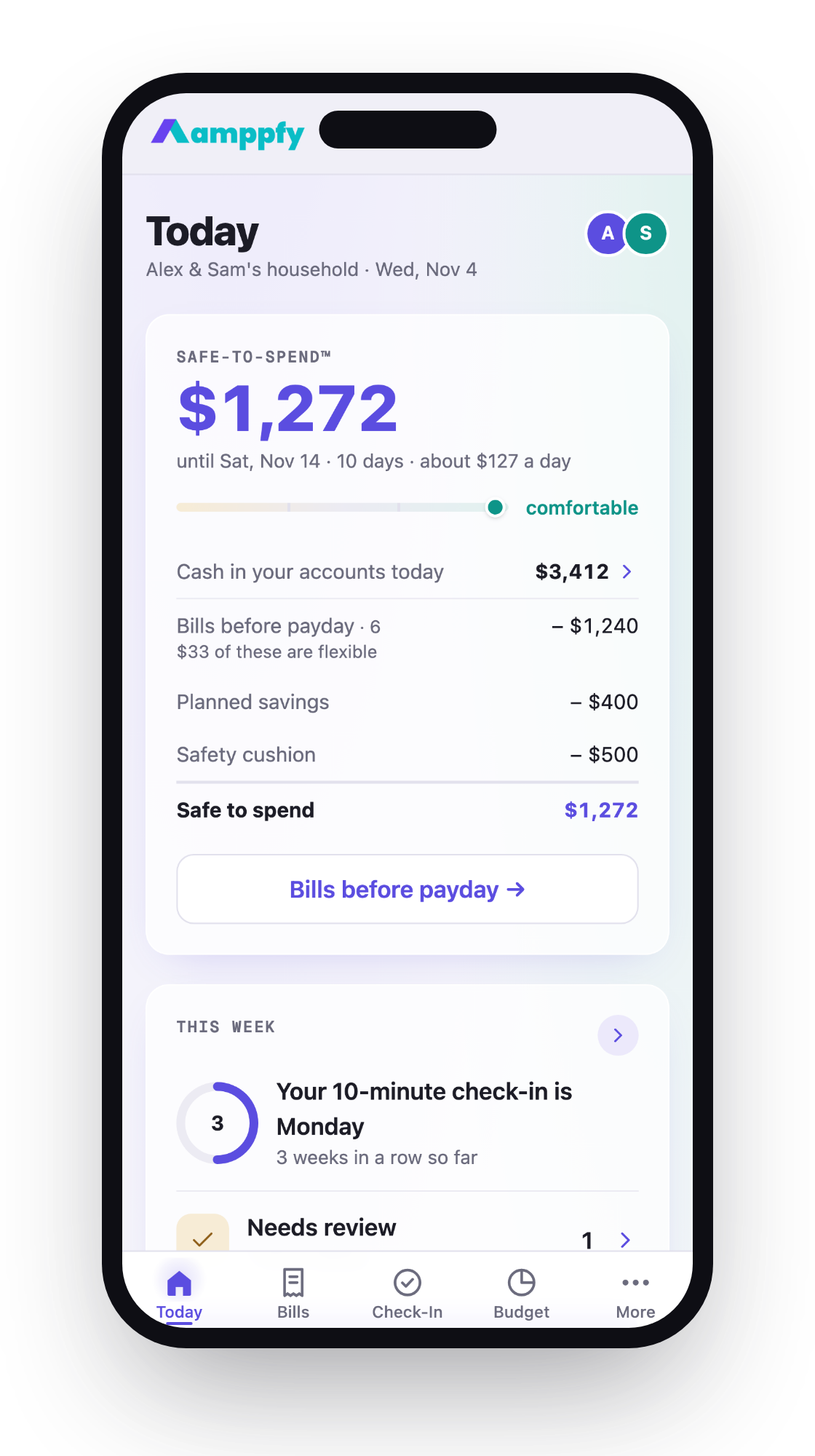
Amppfy works from balances instead of transactions. You type each account balance, about 30 seconds per account, and add your bills, paydays, and goals. It then shows one Safe-to-Spend™ number with the math printed underneath. Here’s an example: $3,412 cash − $1,240 bills before payday − $400 savings − $500 cushion = $1,272. The app also has a bills and paydays calendar that marks your lowest point before payday, a weekly 10-minute check-in, and heads-ups the day before a bill. Goals get funded on payday. There’s no transaction import. It fits households that want one number between now and payday, not a ledger.
Free plan limits to watch
Free plans aren’t stingy by accident. Each limit is a nudge toward Premium. That’s fine, as long as you see it coming.
These are the limits that matter most, based on the plans above:
- Account count. Goodbudget’s free plan allows 1 account. That’s enough if all your money sits in one checking account. It gets tight with a joint account plus two personal ones.
- Device count. Two devices on Goodbudget’s free plan covers one phone each for a couple. Add a tablet and you’re at the ceiling.
- Category or envelope caps. Twenty envelopes sounds like a lot. A family with kids, pets, car costs, and irregular bills can use them up faster than expected.
- History length. One year of history on Goodbudget Free is plenty for this month’s plan. It’s thin if you want to compare December to last December.
- Bank connection. EveryDollar and Goodbudget keep bank connections or transaction import on Premium. The free versions are manual by design.
- Auto-renewal. Money Manager’s paid subscriptions renew automatically. If you try one, put the renewal date in your calendar.
Run a quick check before you commit. Count your accounts. Count the phones and tablets in your house. Think about how far back you’d want to look. If all three numbers fit the free plan, you’re set. If one doesn’t, you’ll know the real price on day one rather than month three.
Android specifics: Google sign-in, widgets, and a partner on iPhone
Google sign-in
Signing in with your Google account saves you one more password. None of the companies above publish Google sign-in details in the facts covered here. So check the sign-in screen when you install. If an app offers it, you’ll see the option right on the first screen.
Home-screen widgets
A widget puts your number on your home screen. You see it at a glance, with no need to open anything. Amppfy has a home-screen widget that shows your Safe-to-Spend™ number. The other apps on this list don’t publish widget details, so look in your phone’s widget picker after you install them. Long-press an empty spot on your home screen, tap Widgets, and scroll to the app’s name.
A partner on iPhone
Mixed-phone households are ordinary. One of you has a Galaxy and the other has an iPhone. What matters is whether the app runs on both stores with one shared account. Goodbudget, EveryDollar, Fudget, Money Manager, and Amppfy all have iPhone versions. Goodbudget syncs a shared budget across household devices. Amppfy lets each partner sign in on their own phone, iPhone or Android, and see the same number. If your partner wants the iPhone side of this comparison, there’s a guide to free budget apps for iPhone that covers it.
Choosing one for your household
The right free budget app for Android is the one you’ll still open in March. Start with your habits, not the feature list.
A few honest matches:
- You like giving every dollar a job: EveryDollar’s zero-based method, or Goodbudget’s envelopes if you think in categories.
- You and a partner share one plan: Goodbudget syncs across devices. Look for apps where each person has their own login, so nobody becomes the household bookkeeper.
- You want the plainest possible view: Fudget’s income-minus-expenses list.
- You love detail and reports: Money Manager’s categories, calendar, and asset graphs.
- You quit an app because bank sync broke: a balance-based app skips that problem entirely. You type what your bank shows and you’re done.
- You’re a single parent on a two-week cycle: look for a calendar that shows your lowest-cash day before payday, so tight weeks don’t surprise you.
Give yourself a simple test. Install one app tonight. Set it up in ten minutes. Open it every day for a week. If you understand your money better on day seven than on day one, keep it. If you don’t, delete it and try the next one. No guilt involved. It’s just a matter of fit.
FAQ
Is there a free budget app for Android that does not need my bank login?
Yes. Several apps on this list work without a bank login. EveryDollar Free and Goodbudget Free use manual entry, and Fudget works from typed lists.
Can my partner on iPhone use the same budget?
Yes, with the right app. Goodbudget syncs and shares a budget across household devices, including iPhones. Amppfy lets your partner sign in on their own iPhone and see the same number, while private accounts stay private.
What do free plans usually limit?
The usual limits are accounts, devices, envelopes or categories, history length, and bank connections. Goodbudget Free, for example, allows 1 account, 2 devices, 20 envelopes, and 1 year of history. Check those numbers against your household before you settle in.
Do free budget apps on Android show ads?
Amppfy shows no ads. The other apps here don’t publish ad details in the facts covered in this guide. The Google Play listing usually notes “Contains ads” under the app name, so look there before you install.
The search for the best budget app for Android free of cost ends faster once you know your own habits. Envelopes, zero-based plans, plain lists, detailed ledgers, and one-number snapshots all work. The trick is picking the style you’ll actually keep up with.
For the platform-neutral view, see the best free budget apps guide covering iPhone, Android, and web.
If one honest number before payday sounds like your style, try a balance-based setup. Get Amppfy free on Android, iPhone, or the web. Enter your balances, bills, and payday once, in about ten minutes, and your Safe-to-Spend™ number will be waiting every time you look.