Free on iPhone and the web

    See Every Subscription You’re Paying for, and What Cancelling One Gives Back

    Every monthly charge in one list, with the date the next one lands. Mark one cancelled and that money goes straight back into your Safe-to-Spend™ number.

    Amppfy’s subscriptions view lists every recurring charge with its next charge date, asks at the weekly check-in whether you still use it, and returns the money from a cancelled subscription to your Safe-to-Spend™ number.

    Download Amppfy on the App Store
    QR code: scan with your iPhone to get Amppfy on the App StoreScan with your iPhone to get the app

    Free  ·  No credit card  ·  Just your balances
    Prefer the web? Sign up free ›

    • No credit card
    • Just your balances
    • Ten minutes a week
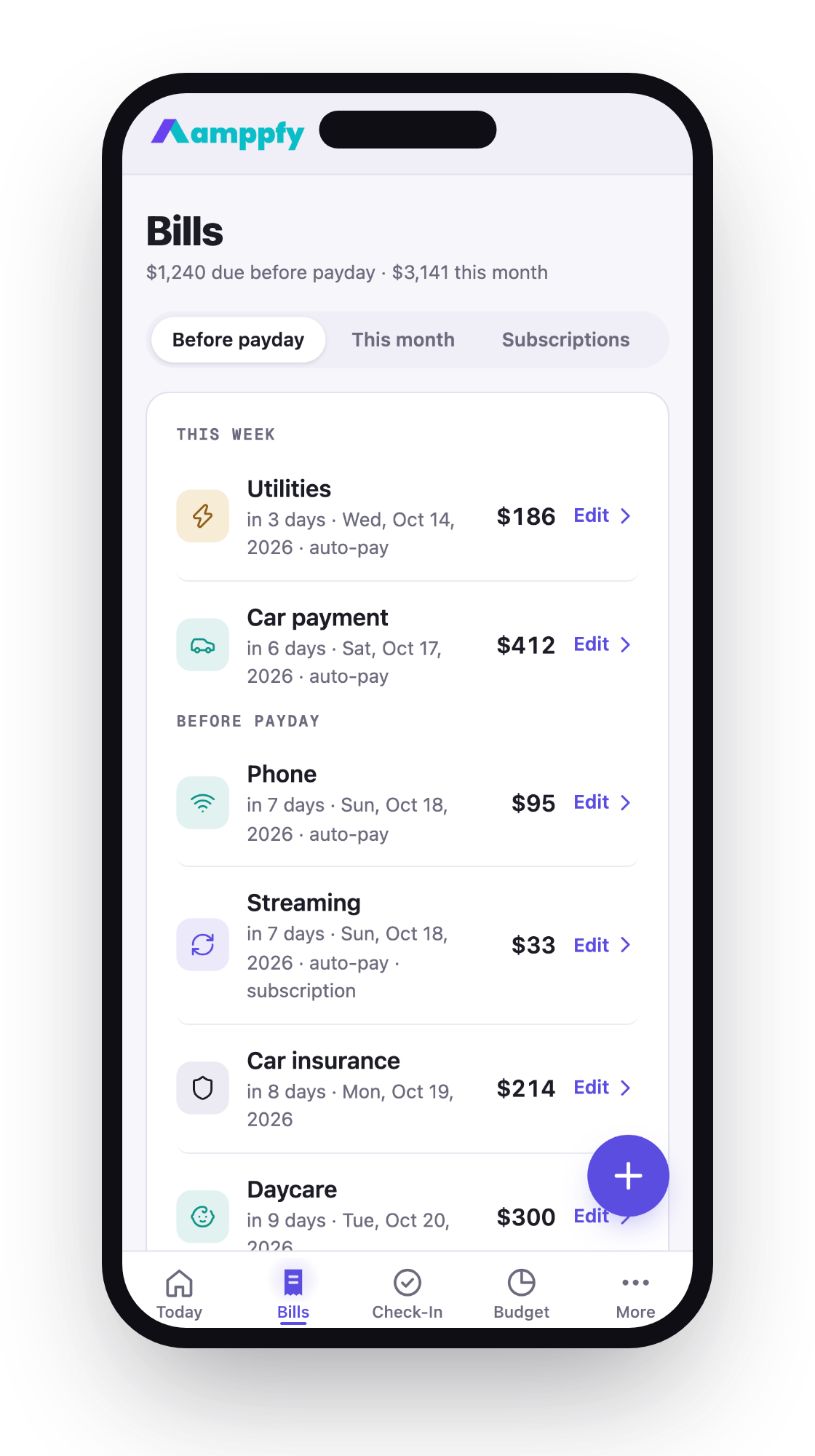
    The Subscriptions card on the Bills tab on iPhone — monthly total, next charge, and Mark cancelled
    THE PROBLEM

    Small charges add up quietly

    Nobody signs up for twelve subscriptions on purpose. They arrive one at a time, and the bank balance is the last to know.

    You’re paying for things you stopped using

    A streaming service from last winter. A trial that became a plan. Each one is small enough to ignore, and together they’re a bill.

    Bill lists quietly go out of date

    A due date typed in March is stale by June. Most apps make you re-enter it, so you stop trusting the list.

    You find out at the bank, not before

    The charge shows up on your bank balance after it happened. By then the money is already gone.

    Every Subscription, with Its Next Charge

    Flag any bill as a subscription and it joins the Subscriptions list on the Bills tab: the monthly total, each service, and the date the next charge lands. Add the ones your bank statement keeps surprising you with.

    The Subscriptions card on the Bills tab on iPhone — monthly total, next charge, and Mark cancelled
    A man on a couch in the evening, phone in hand, deciding which subscription to cancel

    SUBSCRIPTIONS

    Streaming · $33/mo

    Cancelled · $33/mo back in your number

    Mark One Cancelled and Watch the Number Move

    Tap Mark cancelled and that monthly amount goes straight back into your Safe-to-Spend™ number. For services we know, a How to cancel link opens the provider’s own cancel page. Change your mind? Keep it after all puts it back.

    The Check-In Asks: Still Using It?

    Once a week, the check-in lists the subscriptions you haven’t looked at in a while and asks one question: still using it? Two buttons, ten seconds, and nothing renews unnoticed.

    Weekly check-in step 2 on iPhone — Still using these? with Still using it and Cancel it
    The Bills screen on the web — Next 30 days and Subscriptions chips, projected due dates

    Bills Roll Forward on Their Own

    Enter a bill’s due date once. Every cycle, Amppfy projects the next occurrence, so the list never goes stale and only what’s due before payday counts against your number.

    Download Amppfy on the App Store

    Free  ·  No credit card  ·  Just your balances

    Prefer the web? Sign up free ›

    Good to Know

    Good to know

    Can Amppfy Cancel a Subscription for Me?

    No. For services we know, a How to cancel link opens the provider’s cancel page. Once you mark it cancelled, Amppfy puts that monthly amount back into your Safe-to-Spend™ number and keeps the record in case you change your mind.
    Good to know

    What Counts as a Subscription?

    Any bill you flag as one when you add or edit it: streaming, software, a gym, a box that arrives monthly. It stays a normal bill in the math and also appears in the Subscriptions list with its next charge date.
    Free

    Is It Really Free?

    Yes. Clearly-labeled ads and disclosed partner offers pay for Amppfy today, and nothing on the page ever changes your number.

    Know What’s Safe to Spend Before Payday

    Add your subscriptions once. The next charge date, and the money you get back when one goes, stay on the list from then on.

    Download Amppfy on the App Store
    QR code: scan with your iPhone to get Amppfy on the App StoreScan with your iPhone to get the app

    Free  ·  No credit card  ·  Just your balances

    Prefer the web? Sign up free ›