Free on iPhone and the web

    Your Bills, Paydays, and Lowest Point, on One Calendar

    See the month before it happens. On iPhone, get a heads-up the day before a bill lands, or when your cash is running close to your cushion.

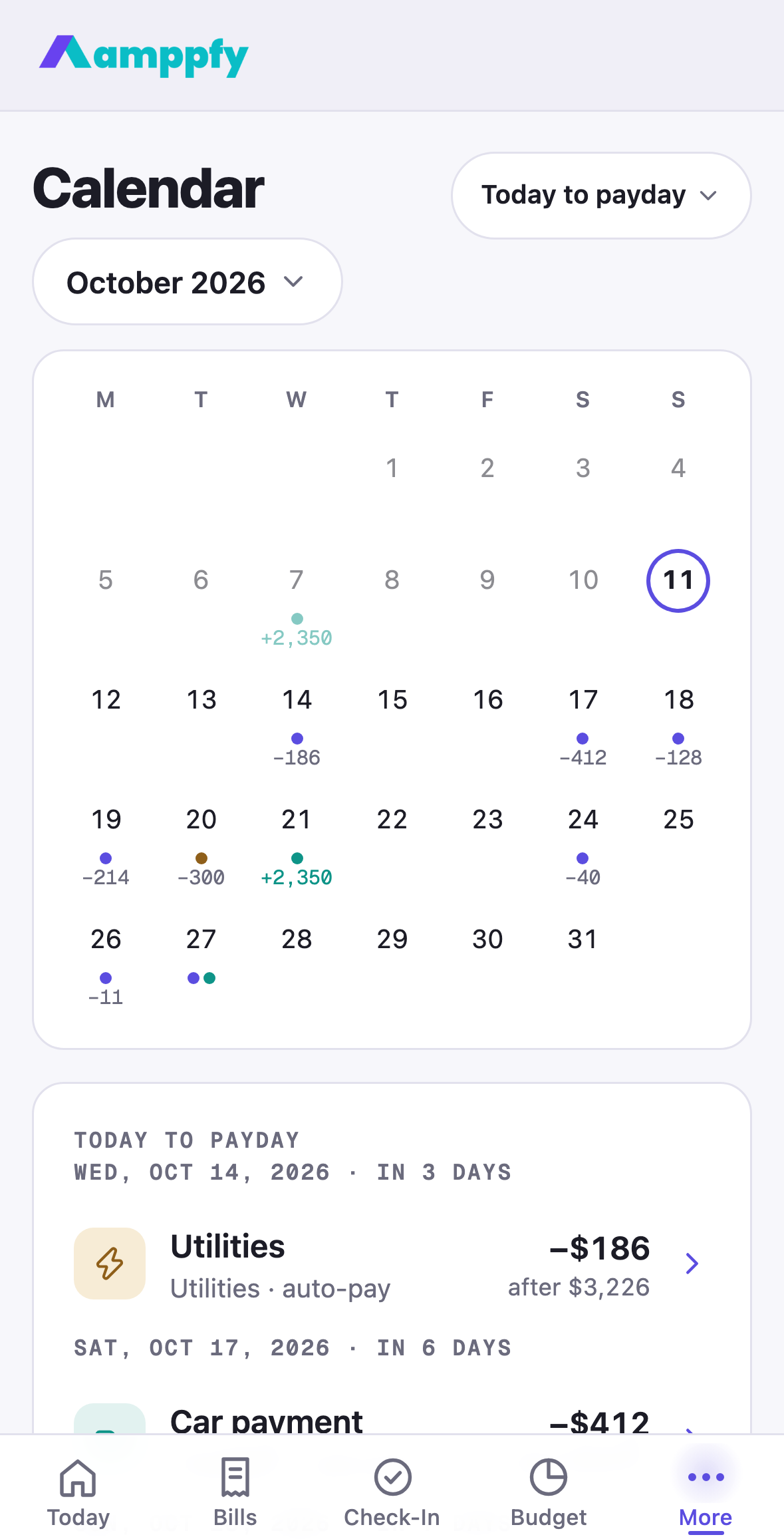
    Amppfy’s calendar puts every bill, payday, and goal move on one month grid and marks the day your cash dips lowest; on iPhone, heads-ups arrive the day before a bill lands or when cash runs close to your cushion.

    Download Amppfy on the App Store
    QR code: scan with your iPhone to get Amppfy on the App StoreScan with your iPhone to get the app

    Free  ·  No credit card  ·  Just your balances

    Prefer the web? Sign up free ›
    • No credit card
    • Just your balances
    • Ten minutes a week
    The Calendar on iPhone with payday selected — paycheck and the amount going to goals
    THE PROBLEM

    The month always has a surprise in it

    You know every bill you have. What you can’t see is the day they all land on the same page.

    Bills land on days you forgot

    Car insurance on the 12th, the phone on the 6th, the card on the 20th. All known, none on the same page.

    The tight day isn’t payday, it’s the day before

    Your bank balance looks fine today. The question is what it looks like on the 24th, after everything has come out.

    Bank alerts arrive after the money moved

    A low-balance text after the charge is a receipt, not a warning.

    A Month You Can Read at a Glance

    Bills, paydays, and the money going to goals sit on one month grid. Auto-pay bills show in grey, the ones you pay by hand in amber, paydays in green. Tap a day to see exactly what lands.

    The Calendar on iPhone — bills, paydays, goal moves, and the lowest point before payday on a month grid
    The Calendar on the web — a month of bills, paydays, and goal moves with the day panel

    The Lowest Point, Marked

    Amppfy runs your balance forward through every bill until payday and circles the day it dips lowest. That’s the day worth knowing about, and now it’s on the calendar instead of in your head.

    A Heads-Up, Never an Alarm

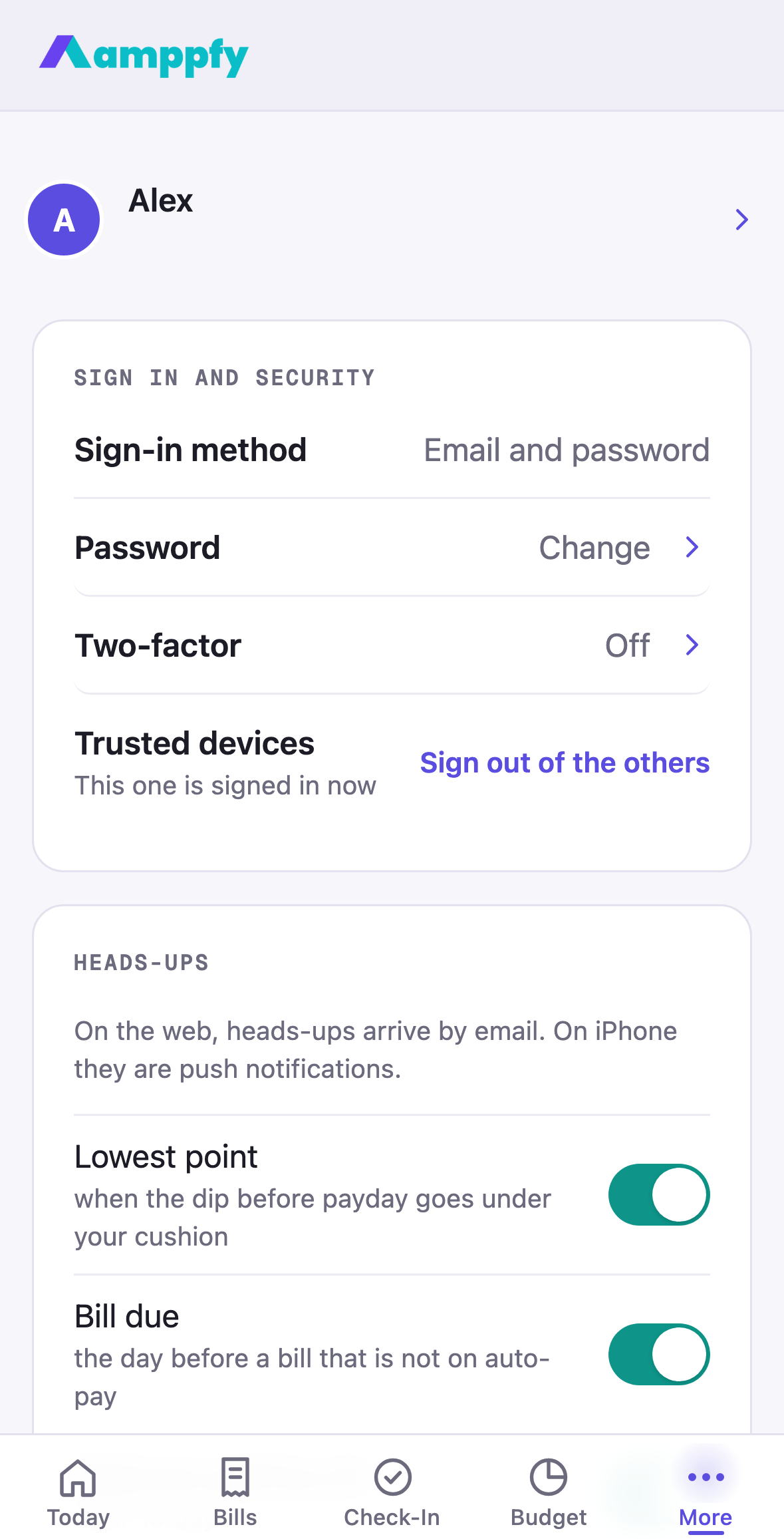
    On iPhone, Amppfy sends a short note the day before a bill that isn’t on auto-pay, when your cash would dip under your cushion, when balances are getting old, and on check-in day. Two a day at most, never at night, and each one says what to do.

    A woman with a morning coffee glancing at a heads-up on her phone

    HEADS-UP  ·  8:00 AM

    Car insurance lands tomorrow

    $214 · Sat, Sep 12 · not on auto-pay

    Heads-ups settings on iPhone — cash dips under the cushion, bill due tomorrow, balances getting old, check-in day, partner finished the check-in, send-around time, email when push is off

    You Decide What You Hear About

    Every heads-up has its own switch under Account, plus the time of day you’d like them. Using Amppfy on the web without an iPhone? The same heads-ups arrive by email.

    Download Amppfy on the App Store

    Free  ·  No credit card  ·  Just your balances

    Prefer the web? Sign up free ›

    Good to Know

    Good to know

    Do I Need the iPhone App for Heads-Ups?

    Push heads-ups are part of the iPhone app (version 1.1.0). If you use Amppfy on the web without an iPhone, the same heads-ups arrive by email — turn that on under Account.
    Good to know

    Will It Notify Me All Day?

    No. At most two scheduled heads-ups a day, none between 9pm and 7am, and each kind has its own switch. A heads-up tells you what’s coming while there’s still time to do something about it.
    The number

    How Is the Number Calculated?

    Your available cash, minus bills due before your next payday, minus the savings your goals set aside, minus your safety cushion. The math is shown on every screen, line by line, so you can check it.

    Know What’s Safe to Spend Before Payday

    Put your bills and paydays on the calendar once. The lowest point and the heads-ups take it from there.

    Download Amppfy on the App Store
    QR code: scan with your iPhone to get Amppfy on the App StoreScan with your iPhone to get the app

    Free  ·  No credit card  ·  Just your balances

    Prefer the web? Sign up free ›