

Money Manager Expense & Budget, from Realbyte Inc., is a familiar name if you’ve searched app stores for a phone-based ledger. Maybe you want to know what it costs before you install it. Maybe you’ve used it for a while and want to know whether the ads go away. Or maybe you’ve logged months of spending and still can’t answer one plain question: how much can you spend before Friday?
That last question is common. It’s also fair. A good ledger answers “where did it go?” very well. “What’s left?” is a different question, and it needs a different kind of math.
Below you’ll find the app’s features, its pricing as of November 2026, who it suits, and what a ledger can’t tell you. You’ll also find a short list of simpler alternatives and an easy way to move your history out if you decide to switch. Every fact about Money Manager comes from Realbyte’s own site and its App Store listing. Where the company doesn’t publish something, this page says so.
What Money Manager Expense & Budget does
At its core, the money manager expense & budget app is a manual ledger for your phone. It runs on Android through Google Play and on iOS. The listing describes entry as “super easy and simple to enter data anytime, anywhere.”
The listing also says: “You can connect your debit card to your accounts so that expenses are automatically recorded under a specific account.” Realbyte doesn’t publish more detail than that, so plan on typing in most of your records yourself.
Here’s what the app includes as of November 2026:
- Weekly and monthly totals with budget tracking
- Category budgets: “Set a monthly budget for each category”
- Receipt photos attached to individual records
- Filters for reviewing past transactions
- Calendar view of the month’s transactions
- Expense charts that break down where money went
- Double-entry bookkeeping for savings, insurance, loans, and real estate
- Asset trend graphs that show balances over time
The double-entry piece stands out. Most phone budget apps keep a simple list of what came in and what went out. Money Manager records both sides of each movement, the way an accountant would. That suits you if you hold a mortgage, a loan, or several savings accounts and want them all in one place.
Money Manager pricing as of November 2026: free, subscriptions, and the Remove Ads version
The pricing has three parts, and each one does something different. Here’s how they look as of November 2026.
| Option | Price | What the listing says |
|---|---|---|
| Free download | Free with in-app purchases | Core ledger features |
| 1 Month Subscription | $2.49 | Auto-renewing |
| 1 Year Subscription | $19.99 | Auto-renewing |
| Money Manager (Remove Ads) | Not stated here | A separate paid listing |
Now the arithmetic. Twelve monthly payments at $2.49 add up to $29.88. The yearly plan costs $19.99. That’s $9.89 less, or roughly a third off. If you know you’ll keep the subscription, the annual plan is the cheaper path.
Both subscriptions renew automatically. Set a reminder a few days before the renewal date. That way you get to decide on purpose, not by default.
If you’re searching “money manager remove ads,” you’ll find a separate listing called “Money Manager (Remove Ads).” It’s a different app entry, not a toggle inside the free version. Check its current price on your store page before you buy. The subscriptions and the Remove Ads version are separate purchases, so read each description to see what you’re getting.
Who Money Manager fits
This app suits a particular kind of person, and that’s no knock on it. Realbyte’s Money Manager works well if you:
- Enjoy bookkeeping and find logging each purchase satisfying, not tedious
- Want every transaction sorted into a category
- Read charts and graphs to spot patterns over weeks and months
- Hold assets like real estate, insurance, or loans you’d like on a double-entry ledger
- Like attaching receipt photos so records hold up later
If that sounds like you, the app gives you a lot of depth at a low price. Some people want depth. Others want speed.
The fit is weaker if logging feels like a chore you keep putting off. A ledger only works when it’s current. Miss a week of entries and the totals drift. That isn’t a flaw in the app. It’s how ledgers work.
Where it runs out: what is safe to spend before payday
A ledger adds up what you’ve spent. That’s its job, and Money Manager does it carefully. Some questions sit outside what any ledger is built to answer, though.
What a ledger cannot tell you
First, it doesn’t separate bills still due before your next payday from bills due after it. Your rent on the 1st and your phone bill on the 20th sit in the same monthly picture. If payday is the 15th, only one of them matters right now.
Second, it doesn’t hold back a cushion. A category budget tells you how much room is left in “Groceries.” It doesn’t set aside a buffer for the surprise co-pay or the tire that goes flat.
Third, if your partner uses the app on another phone, they see a ledger. They don’t see one shared leftover number you both trust.
The math that answers “what’s left”
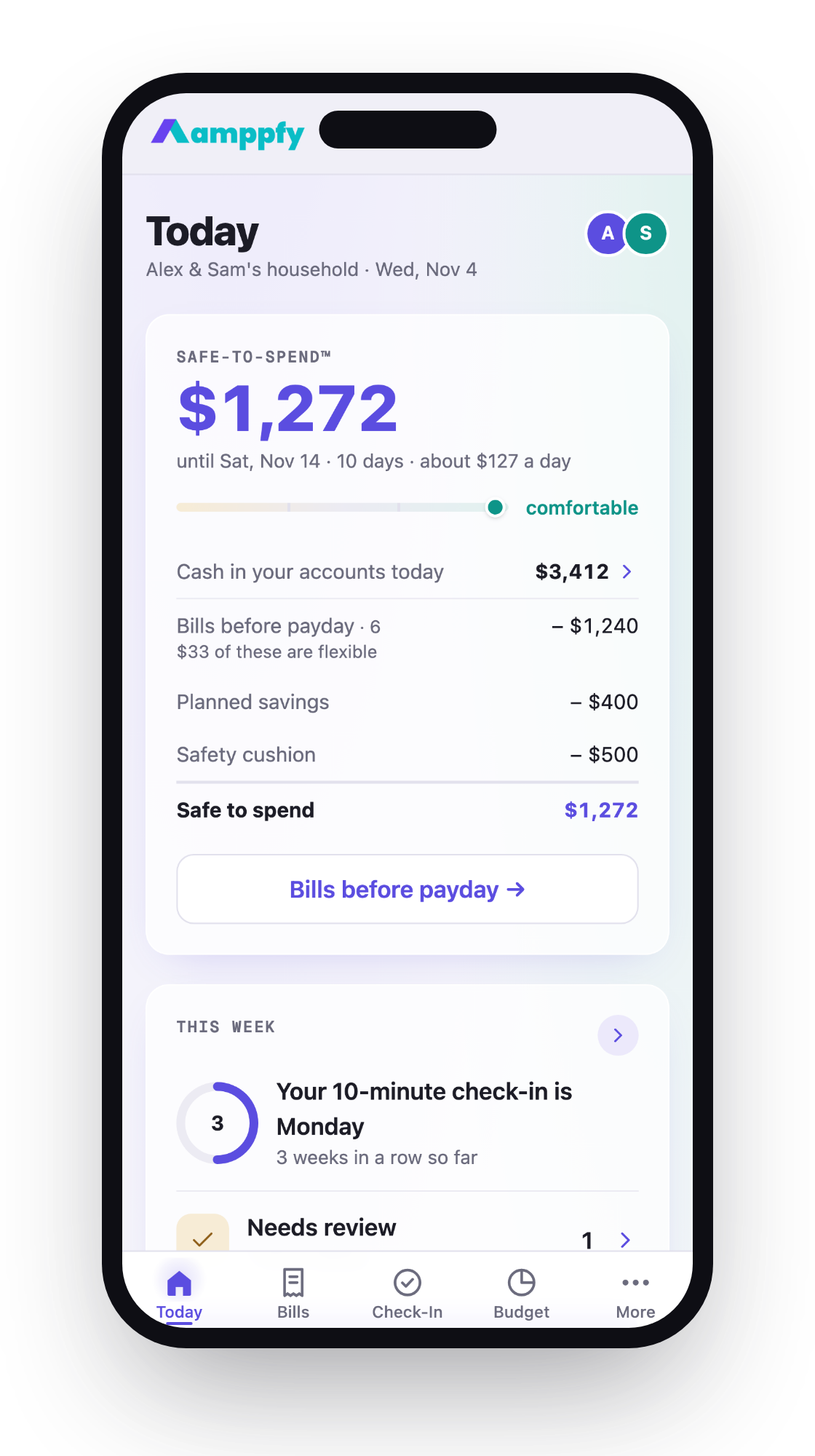
Amppfy calls this number Safe-to-Spend™. Here’s the logic, worked through once:
- Cash on hand: $3,412
- Minus bills due before payday: $1,240
- Minus planned savings: $400
- Minus a safety cushion: $500
- Equals: $1,272
That $1,272 is what you can spend before payday without touching a bill or a goal. Bills due after payday don’t count yet. They’ll come out of the next check.
Simpler alternatives, compared
If you want less logging or a different view of your money, here are three alternatives. Each one fits a different person. Details are as of November 2026.
| App | Price | What you enter | Categories required | Bills before payday shown separately | Built for two people | Platforms |
|---|---|---|---|---|---|---|
| Money Manager (Realbyte) | Free with in-app purchases; $2.49/mo or $19.99/yr | Transactions | Yes | Not published | Not published | Android, iOS |
| Goodbudget | Free (10 regular + 10 more envelopes, 1 account, 2 devices, 1 year history); Premium $10/mo or $80/yr | Transactions into envelopes | Yes (envelopes) | Not published | Not published | Web, Android, iPhone |
| Fudget | Free with in-app purchases; Plus $4.99/mo, $14.99 bi-yearly, $19.99/yr | Income and expense lists | No | Not published | Not published | Not published |
| Amppfy | Free, no ads | Account balances, bills, paydays | No | Yes | Yes (partner invite) | iPhone, Android, web |
Who each one fits
Goodbudget fits you if you like the envelope method. You split income into labeled pots and spend from each one. The free tier gives you 10 regular envelopes plus 10 more, one account, two devices, and one year of history. Premium costs $10 a month or $80 a year.
Fudget: Monthly Budget Planner, by Danny Connell, fits you if you want plain lists. Income goes in one column and expenses in another. Fudget Plus runs $4.99 a month, $14.99 bi-yearly (a term the listing doesn’t define), or $19.99 a year.
Amppfy fits you if you’d rather not categorize at all. You type in your balances, about 30 seconds per account, and add your bills and payday. The app prints the four-line math under the number. A bills calendar marks your lowest point before payday. You get a heads-up the day before a bill, and a short weekly check-in keeps the number fresh. You can invite a partner, too.
Moving your history out
Switching apps doesn’t mean losing your past. It also doesn’t mean retyping it. Here’s a calm way to make the move:
- Export what the app offers. Check Money Manager’s settings for export or backup options and save a copy somewhere you’ll find later. The exact formats aren’t listed among the facts covered here, so look in the app itself.
- Keep the old app installed for a month. If you need to look up an old receipt or a past total, it’s still there. No rush to delete.
- Start the new app with today’s balances. Don’t re-enter months of history. Your current balances already reflect everything that happened before today.
The third step saves the most time. Your checking balance this morning already includes every coffee and grocery run from last quarter. A fresh start with real numbers is accurate on day one. It also takes minutes instead of a weekend.
After a month, open the old app once more. If you haven’t needed it, you can let it go.
FAQ
Is Money Manager free?
Yes, the base app is free with in-app purchases as of November 2026. Optional subscriptions cost $2.49 a month or $19.99 a year, and both renew automatically. You can use the core ledger without paying.
Does it show ads?
The listing doesn’t spell out ad details, but the existence of a separate ad-free listing indicates the free version shows ads. If ads bother you, look at that paid version on your store. Check its listing for current details before buying.
Does it connect to my bank?
Entry is mostly manual. The listing says, “You can connect your debit card to your accounts so that expenses are automatically recorded under a specific account.” Realbyte doesn’t publish further detail about how that works.
Is there a version without ads?
Yes. A separate paid listing called “Money Manager (Remove Ads)” is available. Its price isn’t stated here, so check the current amount on your app store page.
Choosing a money manager app comes down to the question you want answered. If you want a detailed record of every purchase, with charts and double-entry books, Realbyte’s money manager expense & budget app gives you that at a modest price. If you want to know what’s left before payday, a ledger can’t tell you on its own. You need the bills-before-payday math.
You don’t have to give up one approach to try the other. Keep your ledger if you enjoy it. Add a leftover number alongside it if that’s the piece you’re missing.
If you’d like to see your own number this week, get Amppfy free. Set aside about ten minutes to enter your balances, bills, and payday once. After that, the number is ready whenever you glance at it, with the math printed right underneath.