

Both YNAB and EveryDollar ask you to assign every dollar a job before you spend it. That’s zero-based budgeting: income minus planned spending equals zero. Same philosophy, very different apps. If you’ve been weighing YNAB vs. EveryDollar, the real question isn’t which one is “better.” It’s which one matches the way you actually manage money week to week. This comparison breaks down pricing, daily workflow, and the learning curve so you can pick the right fit, or decide neither is quite what you need.
The short answer
YNAB gives you four rules, flexible categories, and optional direct bank import. EveryDollar gives you a Ramsey Solutions budget built around the Baby Steps, with a free manual version. Both use zero-based budgeting, but they feel nothing alike in practice.
Pick YNAB if you want granular control over every category and don’t mind a steeper setup. Pick EveryDollar if you want a simpler budget tied to Ramsey’s Baby Steps and debt snowball approach.
Here’s a quick side-by-side snapshot, with prices as of October 2026:
| Feature | YNAB | EveryDollar |
|---|---|---|
| Budgeting method | Zero-based, four rules | Zero-based, Baby Steps |
| Bank sync | Optional (select banks; file import or manual entry also work) | Premium only (free is manual) |
| Free tier | No (34-day trial) | Yes (manual entry) |
| Paid price | $14.99/mo or $109/yr | $17.99/mo or $79.99/yr |
| Platforms | Web, iOS, Android | Web, iOS, Android |
| Goal tracking | Targets per category | Goal tracking and debt payoff tracker (Premium) |
| Reports | Spending, net worth, age of money | Custom reports and net worth projections (Premium) |
| Partner access | YNAB Together, up to six people | Household feature, separate emails |
YNAB’s paid plan includes everything, including reports. EveryDollar’s free tier is genuinely usable if you’re willing to type in transactions yourself. Neither app charges extra for a partner, and both let each person sign in with their own email.
How each one makes you budget
The core difference is philosophy, not just interface.
YNAB’s four rules
YNAB asks you to do four things: give every dollar a job, embrace your true expenses, roll with the punches, and age your money. In practice, that means you create categories (groceries, gas, fun money, car insurance due in six months), then assign dollars from your actual bank balance to each one.
When you spend more than planned in one category, you move money from another. No guilt, just a decision. Over time, you build a buffer so you’re spending last month’s income this month. That “age of money” metric is YNAB’s signature feature.
The flexibility is real. You can create as many categories and groups as you want. You can set monthly targets, weekly targets, or savings goals by date. Nothing is locked to a template.
EveryDollar’s guided approach
EveryDollar has you plan income minus expenses down to zero each month, with unlimited categories, bill due dates, and sinking funds for bigger costs. You can see what’s left to spend as the month goes on.
If you’re following Ramsey’s Baby Steps (emergency fund, then the debt snowball, then investing), EveryDollar ties in: it shows Baby Steps progress, and Premium adds a debt payoff tracker for the debt snowball, paying debts from smallest to largest.
For people who feel paralyzed by a blank spreadsheet, that framework is helpful. For people who don’t follow the Ramsey approach, YNAB’s method may feel more neutral.
Pricing and plans
Money matters when you’re picking a budgeting app. Paying more for budgeting software than you save with it defeats the point.
YNAB runs $14.99 per month or $109 per year. There’s no free tier, but you get a 34-day trial with no credit card required when you sign up directly, and college students can get a free 365-day trial. Every feature is included in the single plan: bank sync, reports, goal tracking, all of it.
EveryDollar splits into two tiers. The free version handles manual transaction entry and basic budgeting. Premium costs $17.99 per month or $79.99 per year (roughly $6.67 per month on the annual plan) after a 14-day trial for new users, and adds bank connect, custom reports, goal tracking, net worth projections, CSV export, and coaching.
Here’s the math that matters:
| Plan | Monthly cost | Annual cost |
|---|---|---|
| YNAB (single tier) | $14.99 | $109.00 |
| EveryDollar Free | $0 | $0 |
| EveryDollar Premium | $17.99 | $79.99 |
If you want bank sync and pay yearly, EveryDollar Premium costs less ($79.99 vs. $109). If you pay monthly, YNAB costs less ($14.99 vs. $17.99). If you’re fine entering transactions by hand, EveryDollar’s free version costs nothing.
One note on bank sync broadly: connections depend on links between apps, data providers, and banks, and those links sometimes break. If sync reliability matters to you, keep a manual fallback in mind.
Learning curve and upkeep
Getting started with YNAB
YNAB’s learning curve is real. The four rules are simple in concept but take a few weeks to click. You’ll spend your first session adding accounts, creating categories, and assigning dollars. Give yourself time for that first setup, especially with several accounts.
The ongoing work is moderate. If you use bank import, transactions come in automatically, but you still review and categorize them. Skip a week and you’ll face a backlog.
YNAB rewards consistency. The “age of money” metric only improves if you stick with the system over months. That long-term payoff is motivating for some and discouraging for others.
Getting started with EveryDollar
EveryDollar’s setup is simpler: list your income, plan your expenses down to zero, and you have a plan for the month.
On the free plan, daily upkeep means typing in each purchase manually. That takes discipline. On Premium, bank connect streams transactions into your budget, and you still assign them. The Baby Steps framework reduces decision fatigue by giving you one focus at a time.
Reports are a Premium feature on EveryDollar: custom reports to compare spending over time, plus net worth projections. On the free version, you’ll track trends yourself.
A third option worth knowing
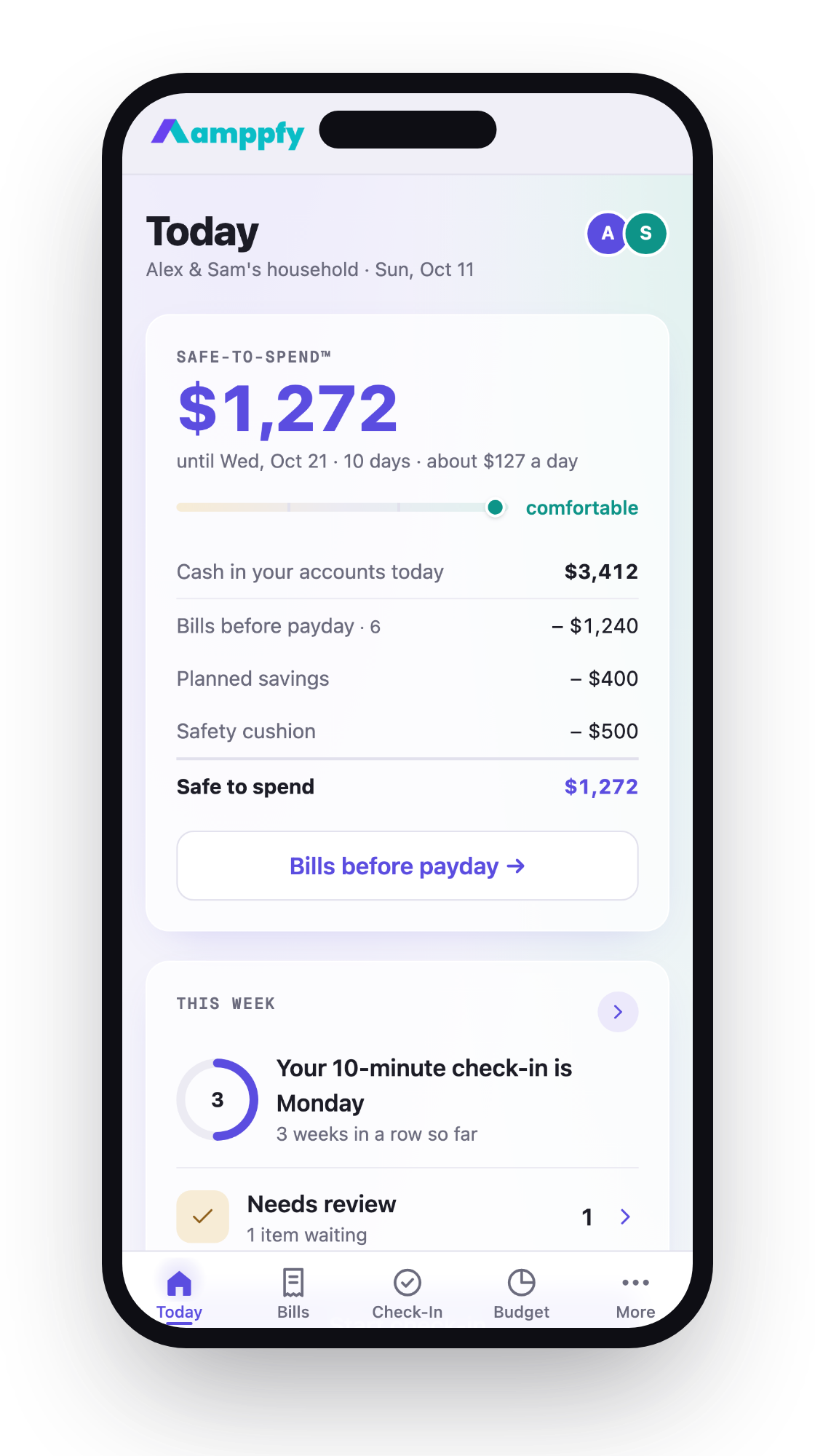
If both apps feel like too much upkeep, a different approach might fit. Amppfy skips transaction categorizing entirely. You enter your balances, bills, and payday once, and the app shows one Safe-to-Spend™ number: your available cash minus bills due before payday, minus planned savings, minus a cushion you set. You update your balances when they change. It’s free on iPhone and the web, and you can invite a partner by email to see the same number. The weekly check-in takes about ten minutes, and each of you gets your own login, so anything you keep private stays private.
Who each one is best for
Not every budgeting app fits every person. Your income pattern, your comfort with money categories, and whether you budget with a partner all shape the right choice.
YNAB fits you if:
- You want full control over category structure and spending targets
- You’re motivated by data: spending reports, net worth graphs, aging money
- You can commit to categorizing transactions every few days
- You have irregular income and need flexible allocation
- You don’t mind paying $109 per year for a single full-featured plan
EveryDollar fits you if:
- You follow or want to follow Ramsey’s Baby Steps
- You prefer a guided template over a blank canvas
- You want a free option and don’t mind manual entry
- You’re focused on debt payoff and want that front and center
- You want bank sync at a lower annual price than YNAB ($79.99/yr)
Neither fits perfectly if:
- You’ve quit budgeting apps before because of categorization fatigue
- You just want to know what’s safe to spend before payday
- You and your partner want one shared number without categorizing transactions
- You don’t trust bank sync and want something simpler than manual transaction logging
The comparison between YNAB and EveryDollar often comes down to personality. YNAB is the flexible notebook. EveryDollar is the guided workbook. Both work if you use them consistently, and both fail if they sit untouched on your phone.
Frequently asked questions
Can I use YNAB or EveryDollar without connecting my bank?
Yes. Both apps support manual transaction entry. EveryDollar’s free tier is manual-only by design. YNAB lets you skip bank sync during setup and enter transactions by hand. Manual entry actually helps some people stay more aware of their spending, since you type in every purchase yourself.
Do YNAB and EveryDollar work for couples?
Yes. YNAB Together lets up to six people share one subscription. EveryDollar’s household feature lets couples manage one budget, each signing in with their own email. Neither charges extra for a partner.
Is EveryDollar’s free plan actually useful?
It is. You get zero-based budgeting with unlimited categories, bill due dates, and sinking funds. The main limitation is no bank connect: you enter every transaction by hand. For people who spend from one or two accounts and buy things a few times a day, that’s manageable. For households with six credit cards and dozens of daily transactions, it gets tedious fast.
Which app is better for getting out of debt?
EveryDollar leans harder into debt payoff with the Baby Steps and, on Premium, a debt payoff tracker built around the debt snowball. YNAB can do the same thing with custom categories and targets, but you build that structure yourself. If you want the debt snowball laid out for you, EveryDollar fits. If you want to design your own payoff strategy with flexible targets, YNAB gives you the tools.
Picking the right zero-based budget for your life
Zero-based budgeting works. The question is whether you’ll stick with the app long enough to see results. YNAB offers depth and flexibility in one paid plan. EveryDollar offers structure and guidance with a free entry point. Both require regular attention to stay useful.
If you’ve tried both and found the upkeep exhausting, you might not need to categorize every transaction at all. You might just need one number that tells you what’s safe to spend before your next paycheck. Get Amppfy free on iPhone or the web: enter your balances, bills, and payday, and your Safe-to-Spend™ number updates when your balances do.