

For couples, roommates, and a parent with an adult child, money talk already takes some patience. Then the app question comes up, and one of you holds an iPhone while the other holds an Android. Suddenly the tool that’s supposed to make things calmer becomes the next thing to sort out.
The good news: this is a solvable problem, and it doesn’t take long. A budget app for iPhone and Android exists in several forms, at several price points. The real work is knowing which details matter when two people on two platforms share one plan.
This guide walks through what to check, how the main options compare as of November 2026, and how to set everything up on both phones in a single evening. You’ll also see one worked example of the math, so the shared number feels honest rather than mysterious.
The mixed-phone problem: one of you on iPhone, one on Android
Mixed-phone households are ordinary. The friction usually comes from how an app was built, not from the phones themselves. Three patterns cause most of it.
- Single-store apps. Some budgeting apps live only on the App Store or only on Google Play. If your partner can’t install it, the plan ends on day one.
- Per-device pricing. Some apps charge for each phone that connects. A second device can quietly double the cost or push you off a free plan.
- Owner and guest roles. One person “owns” the budget and the other gets invited in with fewer rights. That setup tends to turn one partner into the bookkeeper and the other into a spectator.
Each of these has a calm fix. Pick an app that’s on both stores under one account. Read the second-device rules before you commit. Look for equal logins so neither of you is the guest.
There’s a quieter problem underneath, too. Even when both phones can run the app, people want different things from it. One of you may want to see every coffee. The other may just want to know whether the weekend is covered. A good shared setup handles both without making either person do extra chores.
What to check before you pick a budget app for two phones
Before you download anything, run through this short list. It takes about five minutes and saves you a switch later.
- Same account on both stores. Confirm the iPhone app and the Android app sign into the same account. Some apps keep separate data per platform.
- A login for each person. Shared passwords get messy fast. Each of you should sign in with your own email on your own phone.
- A web version. Bills often get paid on a laptop. A browser version means neither phone becomes the “main” one.
- What the free plan allows for a second device. Some free tiers stop at two devices. Others have no free tier at all.
- Private accounts that stay private. Can each of you keep a personal account out of view while the shared number still adds up correctly?
That last point matters more than it looks. Plenty of couples want a shared picture without full visibility into each other’s spending. If the app forces all-or-nothing sharing, someone usually stops opening it.
If you want a longer checklist built around couples specifically, this breakdown of what to look for and what to skip in a couples budget app goes further on roles, privacy, and upkeep.
Budget apps that run on iPhone and Android, compared
The table below uses only details each company publishes on its own site or store listing, as of November 2026. Where a company doesn’t publish a detail, the table says so.
| App | Free plan for two phones | Paid tier | Separate logins for each person | Private vs shared accounts | Web version |
|---|---|---|---|---|---|
| Goodbudget | Limits: 1 account, 2 devices, 10 regular + 10 more envelopes, 1 year of history | $10/month or $80/year, 5 devices | Not published | Not published | Yes |
| EveryDollar | Yes, manual entry (device limits not published) | $6.67/month billed annually at $79.99, or $17.99/month; 14-day trial | Not published | Not published | Yes (computer, phone, or tablet) |
| Monarch Money | None | $14.99/month or $99.99/year | Not published | Not published | Yes (company recommends signing up on the web) |
| YNAB | None (34-day free trial, no credit card required) | $14.99/month or $109/year | Not published | Not published | Yes, plus Apple Watch |
| Amppfy | Yes, one account, no ads | None | Yes, partner invite by email | Private accounts stay private; shared bills assigned to either person | Yes |
A few notes on who each fits. Goodbudget suits couples who like envelopes and want to sync and share budgets across Android, iPhone, and the web. Its free tier covers exactly two devices, which works for a pair but not for a laptop too.
EveryDollar fits people comfortable with manual entry who may want an upgrade later. Its apps exist on both stores, though the site describes access as computer, phone, or tablet rather than naming platforms.
Monarch Money is a cross-platform option covering iOS, Android, and web, suited to households that want a paid tool from the start. YNAB fits people who want direct bank import: it supports select US, Canadian, UK, and EU banks. The 34-day trial gives you a full month of real bills before you pay.
There’s no single best budget app for Android and iPhone here. There’s the one that fits how your household already handles money.
Private accounts, shared number: how couples split it
Couples tend to run money one of three ways.
- Joint. Everything lands in shared accounts. Both of you see it all.
- Separate. Each person keeps their own accounts and splits bills by agreement.
- Hybrid. A joint account covers rent, groceries, and utilities. Each person keeps a personal account too.
Hybrid is common, and it’s where many apps stumble. They either show everything to everyone or split the household into two disconnected budgets.
Here’s the logic that keeps things calm. What you share shouldn’t be each other’s transactions. It should be one leftover number: what’s actually free to spend after the bills and goals you’ve agreed on. Reviewing a partner’s purchases line by line invites commentary. A single shared number invites a quick, practical question instead: are we okay until payday?
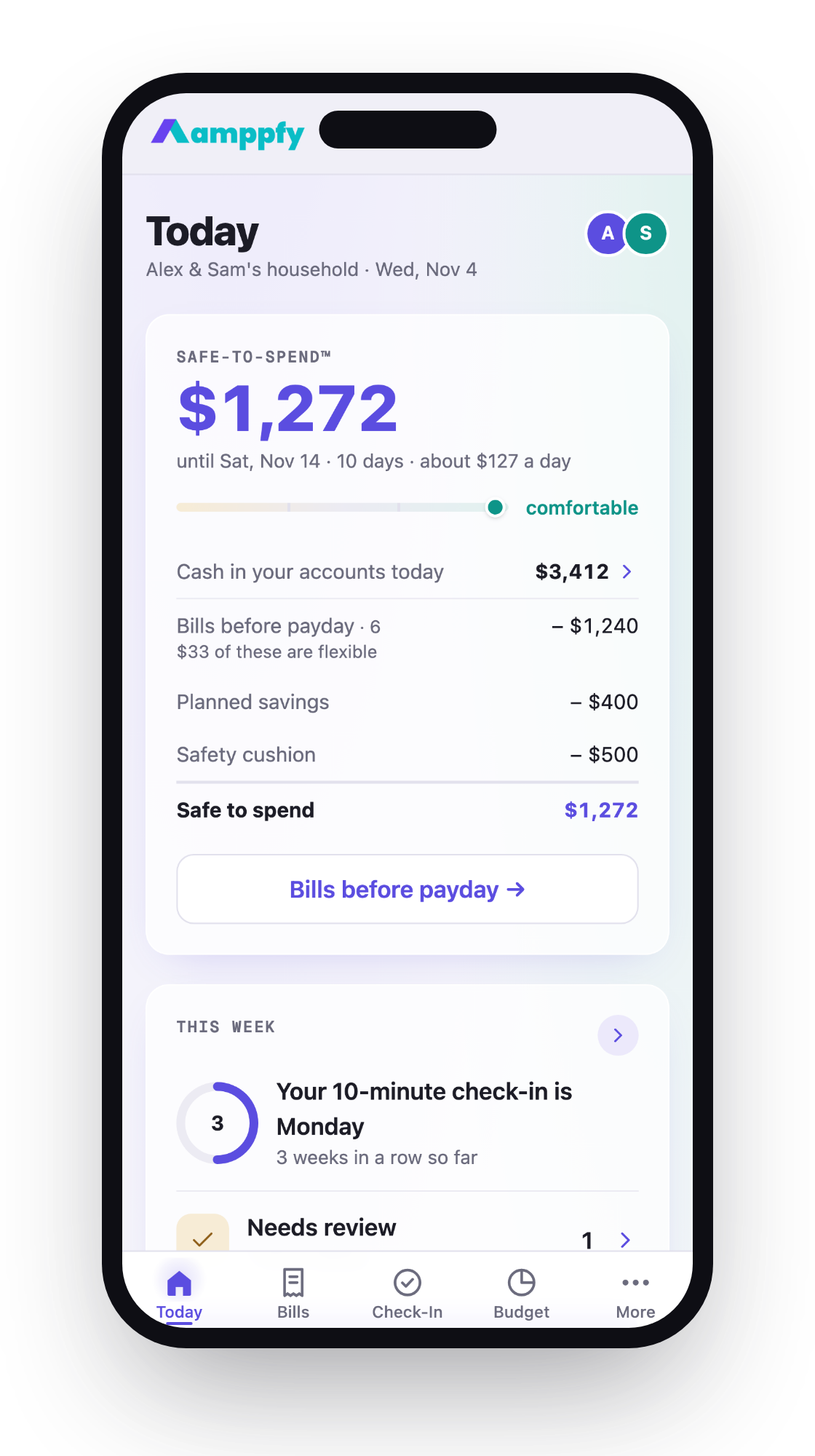
That’s the approach Amppfy takes with its Safe-to-Spend™ number. Each partner signs in on their own phone, both see the same figure and the same math, and personal accounts stay out of view. Shared bills can be assigned to either person, so it’s clear who’s covering what without anyone auditing anyone.
Whatever app you choose, aim for this pattern. Agree on which accounts count toward the shared picture. Leave the rest private. Talk about the number, not the receipts.
Setting it up on both phones in one evening
You don’t need a full weekend for this. One evening, maybe an hour, covers it. Here’s the order that works.
- Install on each store. iPhone from the App Store, Android from Google Play. Open a laptop browser too if the app has a web version.
- One person creates the household. They set up the account, then invite the other by email. The invited partner signs in on their own phone with their own login.
- Agree which accounts count. Decide together which balances feed the shared number. Joint checking, probably. A personal savings account, maybe not.
- Add bills with due dates. Rent, utilities, phone, insurance, subscriptions. Due dates matter because only bills before the next payday affect today’s number.
- Pick the check-in moment. Choose a regular slot, such as Sunday after dinner. Ten minutes, both phones, same screen.
How the math actually works
Once bills and balances are in, the shared number is simple arithmetic. Here’s a worked example:
- Cash on hand: $3,412
- Minus bills due before payday: $1,240
- Minus planned savings: $400
- Minus your safety cushion: $500
- Safe-to-Spend™: $1,272
So $3,412 − $1,240 − $400 − $500 = $1,272. Later bills don’t count yet, because the next paycheck covers them. In Amppfy, those four lines print under the number on both phones, so neither of you has to take it on faith. You can see how the shared household view works on both phones before you set it up.
The weekly check-in keeps it honest. Update balances, glance at what’s coming, and agree on anything unusual. Heads-ups the day before a bill arrive on both phones, so nobody is the only one keeping watch.
FAQ
Do we both have to pay for a budget app?
Not always. Some apps have a free plan that covers two phones, and some have no free plan at all. Check the second-device rules in the comparison table before you commit, since that’s where costs tend to double.
Can my partner see my private account?
It depends on the app. Some let you mark accounts as private so they stay out of view while the shared number still adds up. If privacy matters to you, confirm this before you enter any balances.
What if one of us switches phones later?
If the app runs on both stores under one account, switching is just a sign-in on the new phone. Your data lives with the account, not the device. This is the main reason to pick a cross-platform family budget app from the start.
Does a shared budget need a joint bank account?
No. Separate and hybrid households can share a budget just as well. You simply agree which accounts count toward the shared number and keep the rest personal.
Two phones in one household isn’t a real obstacle. It’s a filter. Pick an app that’s on both stores, gives each person a login, includes a web version, and lets private accounts stay private. Then share one leftover number instead of each other’s spending, and check in for ten minutes a week.
If you’d like to see your own Safe-to-Spend™ figure before your next paycheck, it’s a quick start. Enter your balances, bills, and payday once, in about ten minutes, and the number stays current on every device you use. Get Amppfy free and try it this week.