

You and your partner are both paid on a schedule, but the rent, the groceries, and the car insurance don’t care whose paycheck covers them. One shared account feels like the obvious fix. Then you open your favorite banking app, look for a “joint” button, and there isn’t one.
That gap surprises a lot of couples. Some of the best-known online banks build their accounts for one person only. Others let you add a partner in about two minutes from a settings menu. The difference usually comes down to how the account is legally titled, not how modern the app looks.
If you’ve been searching for which online banks offer joint accounts, here’s the honest picture as of October 2026. Every claim below comes from the bank’s own website, and each source is linked so you can check it yourself. You’ll see who says yes and who says no. You’ll also see the exact menu path or form each bank uses to add a second owner.
Two logins, one shared pot, and private money that stays private: that’s the setup most couples actually want. Start with the yes-or-no answer. Then work out the setup.
The short answer
Several large online banks do offer joint accounts. SoFi, Ally, and Capital One 360 all let two people own the same checking or savings account. Discover checking customers are being moved to Capital One 360 Checking, and existing joint holders carry over.
The app-first neobanks are different. Chime describes its joint accounts as limited and rolling out gradually, so not every member can open one. Current’s deposit agreement rules joint ownership out. Varo’s bank account page lists no joint option. Cash App publishes no joint account at all.
A true joint account means both people legally own the money. Each of you gets equal access, your own debit card, and the same view of the balance. A transfer feature between two individual accounts is not the same thing. It moves money between two people, but neither of you owns the other’s account.
So the quick rule as of October 2026 is simple:
- You want one shared account both of you legally own: look at SoFi, Ally, or Capital One 360.
- You’re happy with an app you already use: check whether it really offers joint ownership or only person-to-person transfers.
- You want to keep separate banks: you can still share bills. You just need a shared view of the numbers instead of a shared account.
The table below gives you the details, bank by bank.
Online banks that offer joint accounts
Each row comes from the company’s own site, as of October 2026. Policies change, so click through before you apply.
| Bank | Joint account offered | How to add a partner | Source |
|---|---|---|---|
| SoFi | Yes, joint Checking and Savings | In the app, tap the gear icon, then “Add a joint account owner” | SoFi help page on adding a joint owner |
| Ally | Yes, joint checking and savings | Submit the Additional Account Owner Application with a wet-ink or digital signature. New applicants also need a W-9 | Ally’s additional owner application |
| Capital One 360 | Yes | Sign in, choose the account, then “account services & settings,” then “add/view joint account holder” | Capital One’s steps to add a joint holder |
| Discover | Checking is becoming Capital One 360 Checking | Joint holders are carried over during the move | Discover checking transition page |
| Chime | Limited, rolling out gradually, not offered to every member | Check the app to see if it’s available to you | Chime’s joint account help article |
| Varo | No joint option listed | Not applicable | Varo bank account page |
| Current | No | Not applicable | Current’s account agreement |
| Cash App | No joint account published | Not applicable | Cash App Pools help page |
Some of the yes banks have extras worth a look. Ally’s joint savings account includes Savings Buckets, so two people can share savings goals inside one account[1]. That’s useful if you save for a trip and a car at the same time. SoFi doesn’t merge two existing accounts into one joint account, so decide which route you want before you open it.
For walkthroughs, see our guides to the Ally joint account and the Capital One 360 joint account.
Who does not: Chime, Varo, Current, Cash App
These four apps are popular, so it helps to know exactly where each one stands.
Chime
Chime says joint accounts are limited. It describes them as rolling out gradually and not offered to every member. If you don’t see the option in your app, that’s expected, not an error. Check back later, or open the shared account somewhere that offers it to everyone.
Varo
Varo’s bank account page lists no joint account option. That’s the whole story from the source. If you need joint ownership, look elsewhere.
Current
Current is the clearest no. Its deposit agreement says the account “may only be owned and titled in the name of one person” and “cannot be owned or titled jointly.” There’s no workaround inside the account itself.
Cash App
Cash App publishes no joint account. It does have Pools, which collect money for group expenses like a shared gift or a trip. Its help page frames Pools as personal use only. A Pool is a collection tool, not a jointly owned account.
None of this means you need to switch banks. If you each like your own app, keep them. You can open a small joint account at one of the yes banks just for shared bills and leave your personal money where it is. Many couples end up there anyway.
How to open a joint account online
The details differ, but the shape is the same at most banks. Budget about 15 minutes if you’re opening a new account together. Allow a little longer if one of you is new to the bank.
| Step | Action |
|---|---|
| 1. Pick the account | Decide on checking, savings, or both. SoFi bundles them. Ally and Capital One 360 let you choose. |
| 2. Gather details | Each of you needs your legal name, address, date of birth, and Social Security number. |
| 3. Decide who starts | One person opens or already holds the account. The other gets added as a co-owner. |
| 4. Add the second owner | Use the bank’s own path. That’s the gear icon at SoFi, the settings menu at Capital One 360, or the application form at Ally. |
| 5. Sign | Ally accepts a wet-ink or digital signature. New applicants there also submit a W-9. |
| 6. Fund it | Move in your first shared deposit from either person’s existing account. |
| 7. Order cards | Each owner gets their own debit card where the bank offers one. |
A few habits make the first month smoother. Agree on a regular deposit amount before payday, not after. Name the account clearly in both apps, something like “House bills.” Turn on balance alerts for both of you, so neither person is the only one watching.
Joint, separate, or both: one number for two people
A joint account solves who owns the money. It doesn’t answer the question you both ask on a Thursday night: how much can we actually spend before payday?
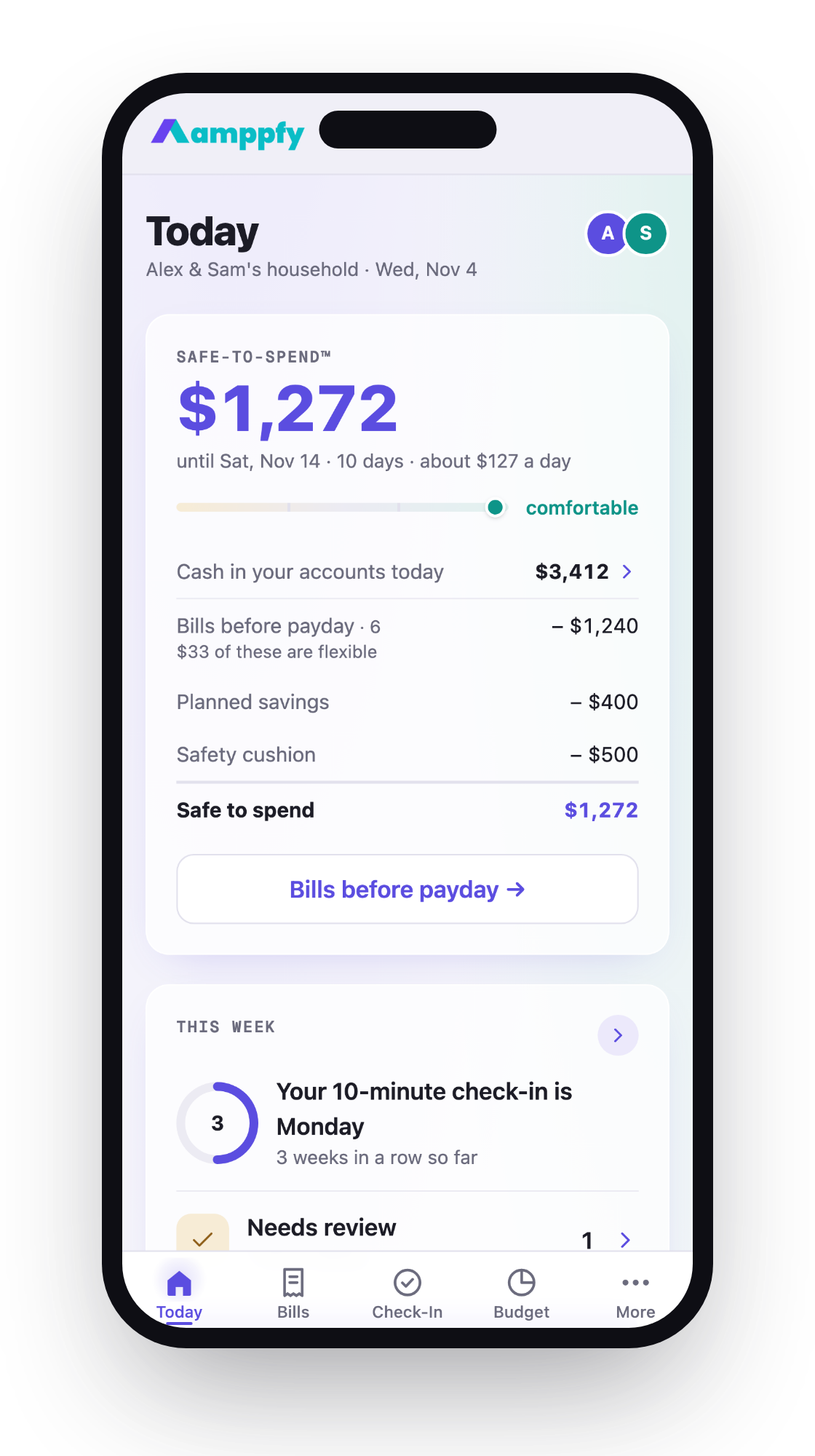
The balance doesn’t answer it. Say the joint account shows $2,400. Rent of $1,500 leaves on the 1st, and payday is the 3rd. A $150 transfer to the vacation bucket is planned. You’d like $200 kept back as a cushion. The math looks like this:
- Available cash: $2,400
- Minus bills due before payday: $1,500
- Minus planned savings: $150
- Minus your cushion: $200
- Safe to spend: $550
That $550 is the number that matters. And it’s the same whether you share one account, keep everything separate, or run a hybrid. Many couples run some version of the hybrid: a joint account for shared bills, plus personal accounts for everything else.
The friction is visibility. One partner usually ends up as the household calculator, and the other asks. Amppfy turns that arithmetic into one Safe-to-Spend™ number. You type in your balances yourself, with no bank login, and the four lines of math sit right under the number. Each partner gets their own login on iPhone, Android, or the web and sees the same number. Personal accounts you mark private stay private.
For the full comparison of each setup, read bank accounts for couples: joint, separate, or both. If you’re staying fully separate, here’s how to budget as a couple without merging money.
Bank-by-bank how-tos
How to add a partner or open a joint account at each bank, as published on its own site:
- Bank of America Joint Account: How to Add Your Partner or Open One Together
- Wells Fargo Joint Account: How to Add a Partner to Checking
- Capital One 360 Joint Account: Opening One and Adding a Partner
- Ally Joint Account: How Two People Share Checking and Savings
- Navy Federal Joint Account: Adding a Spouse or Partner
- SoFi Joint Account: How to Open One or Add a Partner to Checking and Savings
- PNC Joint Account: Opening One Together or Adding a Partner
- USAA Joint Account: Adding a Spouse or Partner (Including Non-Members)
- Does Chime Have Joint Accounts? What Couples Can Do Instead
- Joint Bank Accounts for Unmarried Couples: What Changes, What Doesn’t, and How to Set One Up
- U.S. Bank Joint Account: Adding a Partner or Opening One Together
- Truist Joint Account: How to Add a Partner to Checking
- TD Bank Joint Account: How to Open One or Add a Partner
- Regions Joint Account: Opening One Together or Adding a Partner
- How to Open a Joint Bank Account Online (Without a Branch Visit)
FAQ
Can I add my partner to an account I already have?
Usually, yes, at banks that offer joint ownership. SoFi uses the gear icon and “Add a joint account owner.” Capital One 360 uses “account services & settings,” then “add/view joint account holder.” Ally uses its Additional Account Owner Application.
What happens to my Discover joint checking account?
Discover checking accounts are becoming Capital One 360 Checking, as of October 2026. Joint holders are carried over, so your partner stays on the account.
Is a Cash App Pool the same as a joint account?
No. Pools collect money for group expenses, and Cash App describes them as personal use only. Neither person co-owns the money the way joint owners do at a bank.
Do we have to merge everything to share bills?
No. A small joint account for shared bills plus separate personal accounts works well for many couples. What matters more is that you both see the same number before you spend.
So which online banks offer joint accounts? As of October 2026, SoFi, Ally, and Capital One 360 do, and Discover’s joint holders carry over to Capital One 360. Chime’s version is limited. Varo lists none, Current rules it out, and Cash App publishes none.
Pick the setup that fits how you two already live. That might mean one joint account, two separate ones, or a bit of both. Then make the shared math visible to both of you, so nobody has to be the one doing it.
Take ten minutes this week to set up Amppfy for couples. Send your partner the invite, and you’ll both be looking at the same Safe-to-Spend™ number by Sunday.