Most people who’ve tried a budgeting app have hit the same screen: a prompt asking for your bank username and password. It feels wrong, even when the app swears it’s safe. That hesitation is reasonable. You’re handing over keys to your financial life, and you deserve to know exactly what happens next. Whether budget apps actually need your bank login depends on how they work and what you want from them. Some apps pull transactions automatically. Others let you type in a few numbers yourself. The right choice comes down to your comfort level, your privacy threshold, and how much time you’re willing to spend each week.
How account linking works
When you tap “connect your bank” inside a budgeting app, you’re rarely giving that app your credentials directly. Instead, most apps route you through a middleman: a data aggregator like Plaid, MX, or Finicity. Think of it like a locked mailroom. You hand your key to the mailroom clerk, the clerk opens your mailbox, photocopies your statements, and passes the copies to the app. Plaid, for one, says it doesn’t share your bank username and password with the apps you connect.
Here’s the typical flow:
- You select your bank from a list inside the app.
- The app opens the aggregator’s connection screen.
- Depending on your bank, you’re sent to your bank’s own site to sign in, or you enter your bank username and password inside the aggregator’s screen.
- You may be asked for a two-factor code from your bank.
- The aggregator gets ongoing access, often through a secure token from your bank, so it can refresh your data on a schedule.
- Your transactions, balances, and account details flow into the app.
Older connections relied on screen scraping, where the aggregator logged in as you and read the webpage. The industry is shifting toward API connections, where your bank shares data through a formal, structured channel. Plaid describes three ways it connects: OAuth, where you sign in on your bank’s site and Plaid doesn’t store your credentials; bank APIs, where you sign in inside Plaid’s flow and Plaid connects without storing your credentials; and, in some cases, stored credentials that Plaid uses to collect the data[1].
The key distinction: with OAuth or a bank API, the aggregator doesn’t keep your password. With stored credentials, it does. If you’d rather sign in on your bank’s own site, check whether your bank offers that option when you connect.
Why apps use aggregators
Building a direct connection to every bank in the country is wildly expensive. There are thousands of banks and credit unions in the U.S. No single budgeting app can negotiate data-sharing agreements with all of them. Aggregators solve that problem by maintaining thousands of connections in one place.
| Reason | What it means for you |
|---|---|
| Scale | One aggregator covers thousands of institutions, so your small regional bank probably works. |
| Security infrastructure | Aggregators invest heavily in encryption, tokenization, and compliance: costs a startup can’t absorb alone. |
| Maintenance | Banks change their login screens and APIs constantly. The aggregator handles updates so the app doesn’t break. |
| Regulatory alignment | Aggregators track evolving federal guidance on data sharing, reducing legal risk for the app. |
That regulatory picture is shifting. The CFPB’s Personal Financial Data Rights rule (Section 1033) sets out how banks must make your data available to apps you authorize, with the largest institutions originally due to comply first. On October 29, 2025, a federal court stayed the rule’s compliance dates, and the CFPB has said it is reconsidering the rule and plans to propose extending those dates[2].
What does that mean for you? The rules are still catching up. Until the data-sharing rule takes effect, you’re largely relying on the bank’s, the aggregator’s, and the app’s own practices for how your data flows between them.
What access you are granting
The login screen feels like a yes-or-no decision, but the access you’re granting has layers. Knowing what’s included helps you weigh the trade-off.
Data the aggregator typically pulls
- Account balances (checking, savings, credit cards, loans)
- Transaction history (amount, date, payee, description)
- Account and routing numbers
- Account holder name and contact info
That list matches what Plaid’s privacy policy says it can collect from connected accounts[3]. Plaid shares that data with the apps you choose to connect.
What a budgeting connection usually doesn’t include
- Your bank password shared with the app itself
- Permission for the budgeting app to move money (payment features are separate and ask for their own permission)
- Investment trades or wire transfers
For budgeting, the connection is used to read your data. Aggregators also offer payment products, so check what an app asks for when you connect. Even read-only access isn’t risk-free. Your transaction history reveals where you shop, what you subscribe to, your income, and your spending patterns. That’s valuable information.
Some apps share anonymized or aggregated data with third parties for analytics, marketing, or product development. Check the app’s privacy policy for phrases like “de-identified data” or “business partners.” If the policy is vague, treat that as a yellow flag.
When access breaks
Bank syncs can fail. Your bank changes its security flow, the connection’s access expires, or a software update disrupts it. When sync breaks, you’re stuck manually entering data anyway, at least until the connection is restored. That gap can leave your spending picture incomplete for days.
Apps that work without linking
Not every budgeting app requires a bank login. Several options let you enter your own numbers and skip the aggregator entirely. The trade-off is obvious: you spend a little time each week typing in balances instead of waiting for auto-sync.
Here’s how the two approaches compare:
| Feature | Auto-linked apps | Manual-entry apps |
|---|---|---|
| Setup time | Finding your bank, signing in, verifying | Typing balances, bills, payday |
| Weekly upkeep | Near zero when sync works; unpredictable when it breaks | A few minutes whenever balances change |
| Data shared | Transaction history, balances, account details go to the aggregator | Only the numbers you type in; no bank login or transaction history |
| Privacy | You trust the aggregator and the app | You trust the app with the numbers you enter |
| Accuracy | Depends on sync reliability | Depends on you updating regularly |
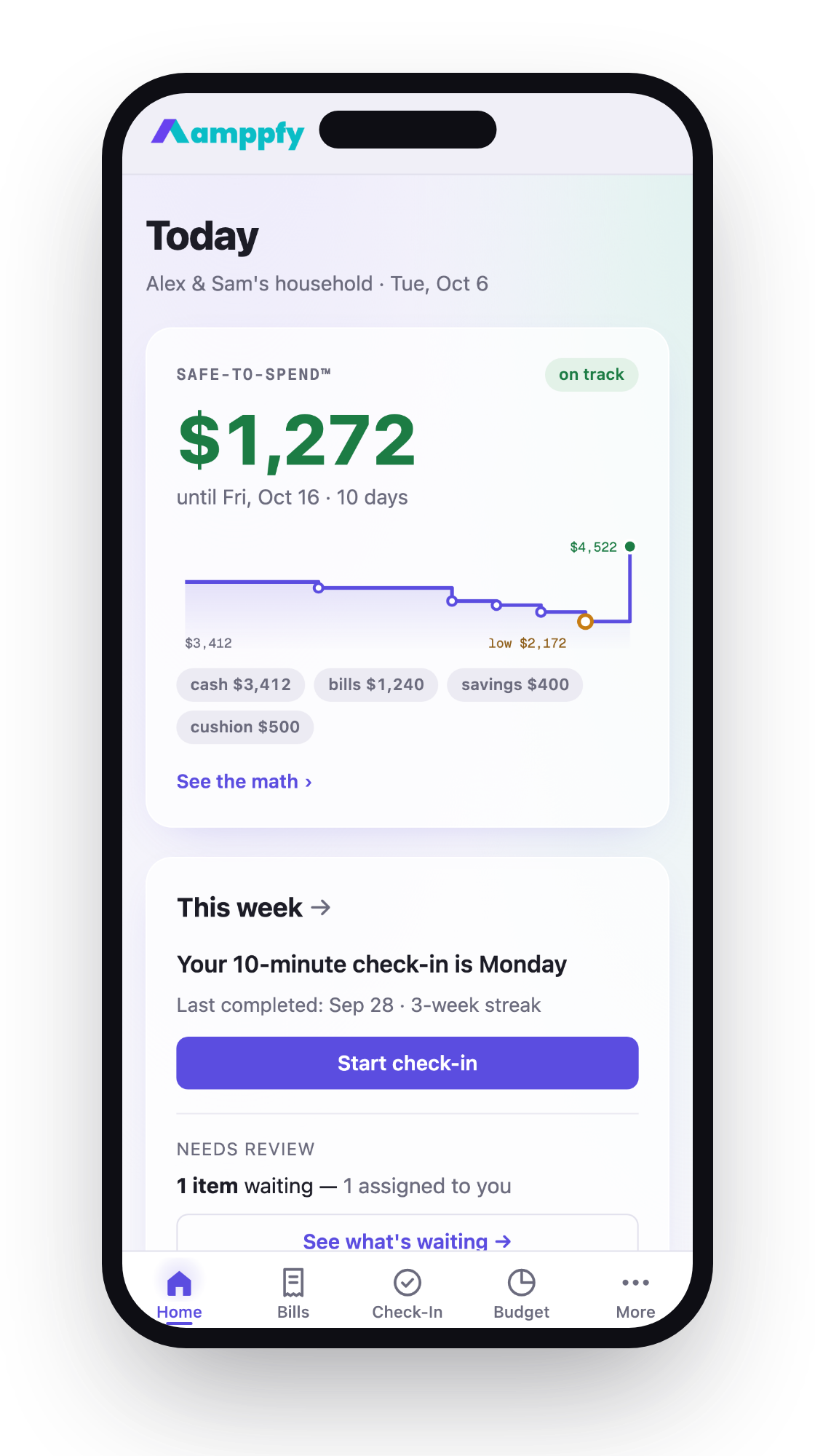
Amppfy takes the manual-entry approach. You type in your balances (about 30 seconds per account), add your bills and payday, and the app calculates a single Safe-to-Spend™ number: your available cash minus bills due before payday, minus planned savings, minus a safety cushion you pick. The math is printed right under the number. No bank login and no transaction import. A weekly check-in of about ten minutes keeps the number current.
Spreadsheets work too, though you build the bill calendar and the math yourself. So do budget apps need your bank login? Not all of them. You have options.
Questions to ask before you connect
Before you hand over credentials to any app, run through this checklist. It takes five minutes and saves you from surprises later.
- Does the app use an aggregator or store my credentials directly? Find out whether you’ll sign in on your bank’s own site or hand your password to a third party.
- Is the connection read-only? Confirm the app can view data but can’t initiate transfers, payments, or account changes.
- What happens to my data if I delete the app? Look for a clear data deletion policy, and remember the aggregator may hold a copy too. Plaid, for example, lets you disconnect apps and delete your data through Plaid Portal.
- Does the app sell or share my data with third parties? Check the privacy policy for terms like “analytics partners” or “marketing affiliates.”
- How does the app handle sync failures? Ask whether you’ll be notified and whether there’s a manual fallback.
If any answer makes you uncomfortable, a manual-entry app removes the question. Your bank credentials and transaction history stay out of it. The cost is a few minutes of your time each week.
Frequently asked questions
Can a budget app move money out of my bank account?
A connection used only to read your data doesn’t move money. Some apps offer bill-pay or savings-transfer features, and those ask for separate permission. Check what you’re agreeing to on the connection screen before you continue.
What if my bank isn’t supported by the aggregator?
This happens more often with small community banks and credit unions. If your bank isn’t listed, the app usually can’t connect at all. Ask the app’s support team whether your institution is on the way, but there’s no guaranteed timeline. A manual-entry app sidesteps this: you type your balance regardless of where you bank.
Is it safe to give my bank login to Plaid or similar aggregators?
Plaid says it uses encrypted APIs and doesn’t share your bank username and password with the apps you connect. With OAuth connections, you sign in on your bank’s site and Plaid doesn’t store your credentials; in some cases it does store them to collect your data[1]. No system is completely immune to breaches. The real question is whether you’re comfortable with a third party holding a window into your transaction history. If not, manual entry is the alternative.
Do budget apps need bank login details every time I open them?
No. After the initial connection, the aggregator keeps ongoing access and refreshes your data on a schedule. You log into the budgeting app with your app-specific password, and the data flows in the background. You may need to re-authenticate occasionally, especially if your bank updates its security protocols or if the access expires.
Your next step
The question of whether budget apps need your bank login has a simple answer: some do, some don’t. Auto-linked apps trade privacy for convenience. Manual-entry apps trade a few minutes of your week for more control over your data. Neither approach is wrong. The right one depends on what you value more.
If you’d rather skip the bank login and still see exactly what’s safe to spend before payday, Amppfy is free on iPhone and the web, and setup takes about ten minutes. Enter your balances, bills, and payday once, and your Safe-to-Spend™ number is there, with the math under it. Get the app free and try it before your next paycheck.