You’ve tried a budgeting app before. Maybe two or three. Some were free, some charged monthly, and you’re still not sure what you actually got for the money. The choice between free and paid budget apps isn’t as simple as “you get what you pay for.” Some free tools do exactly what you need. Some paid ones charge $10 a month for features you’ll never touch. The real question is which features matter for your specific situation: your income, your bills, your household. That’s what this piece breaks down, section by section, so you can stop guessing and start choosing.
Why Most Budget Apps Charge a Subscription
Building a budgeting app costs real money. Developers, servers, security audits, customer support: none of it is cheap. For apps that link to your bank, another cost is bank data access.
Many paid apps pull your transactions from your bank through a data aggregator like Plaid or MX, and the aggregator charges the app maker. Plaid, for example, lists one-time fees per connected account, monthly subscription fees per connected account, and per-request fees, depending on the product[1]. The more accounts users connect, the more it can cost the app. That expense gets passed to you as a subscription.
The regulatory picture adds uncertainty. The CFPB’s 2024 Personal Financial Data Rights rule (Section 1033) said banks must make your data available without charging fees[2]. On October 29, 2025, a federal court stayed the rule’s compliance dates, and the CFPB is reconsidering the rule, including how fees should be handled[3]. Until that’s settled, the cost of bank data stays part of the business.
There’s also business model pressure. If a free tier doesn’t convert enough paying subscribers, the business struggles, so many apps put their core features behind a monthly or annual fee.
As of October 2026, several premium budget apps charge roughly $95 to $109 per year on annual plans: YNAB is $109/year, Monarch Money’s Core plan is $99.99/year, and Copilot Money is $95/year. That’s about $8 to $9 per month, on top of every other subscription you already pay for.
What the Free Plans Include
Free budget apps aren’t empty shells. Most give you enough to build a basic financial picture. Here’s what you’ll typically find on a free tier:
- Manual balance entry. You type in what’s in your accounts. No bank login required.
- Basic budgeting categories. Set spending limits by category: groceries, rent, gas.
- Bill reminders. Get notified before a due date so you don’t miss a payment.
- Single-user access. One login, one view of your finances.
- Limited account connections. Some free tiers allow one or two linked bank accounts.
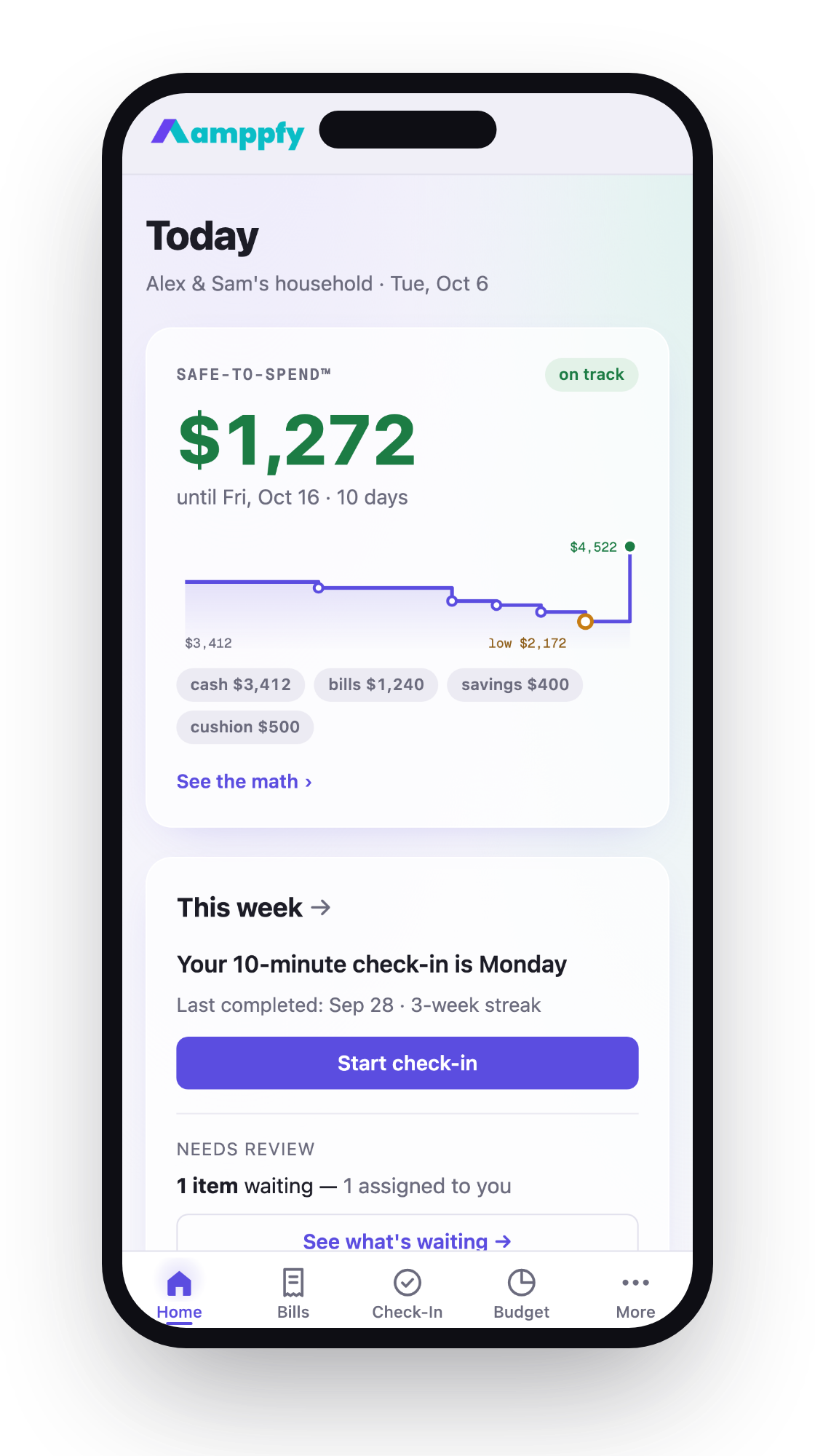
A few apps go further without charging. Amppfy, for example, is free on iPhone and the web and shows a single Safe-to-Spend™ number: your available cash minus bills due before payday, minus planned savings, minus a safety cushion you set. The math is printed right under the number. It also includes a bills calendar with paydays, a Subscriptions card that lists each subscription’s monthly cost and next charge, savings goals, a Budget page, and a net worth page, and you can invite a partner by email. You enter balances yourself, with no bank login.
The trade-off with most free apps is depth. You won’t get AI-powered insights, investment tracking, or automatic transaction categorization. You also won’t get priority support. But if your main goal is knowing what’s safe to spend before your next paycheck, a free app can handle that.
One thing to watch: some “free” apps are really free trials. They give you full access for a trial period, often one to five weeks, then ask you to pay. Check whether the free plan is ongoing before you invest time setting it up.
What Paid Plans Add
Paid budget apps earn their price tag through three broad categories: automation, intelligence, and household tools. Here’s how they typically break down compared to free tiers:
| Feature | Free Plans | Paid Plans |
|---|---|---|
| Bank sync | None or 1-2 accounts | Unlimited accounts |
| Transaction categorization | Manual | Automatic (some apps use AI) |
| Reports and trends | Basic monthly view | Custom date ranges, charts |
| Investment tracking | Rarely included | Portfolio view, net worth |
| Partner/family access | Sometimes one partner | Varies: YNAB Together covers up to six people; Monarch invites a partner at no extra cost |
| Bill negotiation | Rocket Money offers it on its free tier for a success fee | No success fee on Rocket Money Premium+ |
| AI assistant | Rare | Some apps, such as Rocket Money Premium+ |
Some paid apps now add AI features. Rocket Money’s Premium+ plan ($15/month as of October 2026) includes Rowan, which the company calls an AI-powered personal financial assistant, and Copilot Money says its AI tags every transaction automatically. Rocket Money Premium also includes a concierge that cancels subscriptions for you.
Is automation worth $100 a year?
That depends on your time and your tolerance for manual entry. If you have six bank accounts, two credit cards, and a brokerage account, automatic syncing saves real hours each month. If you have a checking account and a savings account, typing in two numbers once a week takes a minute or two. A short weekly check-in can replace a lot of automation.
How Free Apps Make Money
If you’re not paying for the app, someone else is. Or the app is collecting something from you besides cash. Here are the most common revenue models for free budgeting apps:
- Affiliate referrals. The app recommends a credit card or savings account. If you sign up, the app earns a commission.
- Anonymized data sales. Some apps may share or sell de-identified spending data to other companies. Read the privacy policy.
- Freemium upsells. The free version works, but the app regularly nudges you toward a paid plan. The free tier is a marketing funnel.
- Advertising. Display ads inside the app. Less common in finance apps than in other categories, but it happens.
- Premium add-ons. The core app is free, but specific features like credit score monitoring or investment advice cost extra.
Not all of these models are bad. Affiliate referrals can actually help you find a better savings rate. But data sales deserve scrutiny. Check whether the app shares your transaction data with third parties. If the privacy policy is vague, assume the worst.
Some free apps don’t ask for a bank login at all, so they never import your transactions. That’s a different privacy posture than apps that pull every purchase you make.
The key question isn’t “is this app really free?” It’s “what am I trading for free access, and am I comfortable with that trade?”
Deciding if Paid Is Worth It for You
The answer isn’t the same for everyone. Your household setup, your number of accounts, and your willingness to spend a few minutes a week all factor in. Here’s a framework:
A paid app probably fits if you:
- Have five or more financial accounts across multiple banks
- Want automatic transaction categorization without manual effort
- Need investment tracking alongside your budget
- Want an app to cancel subscriptions or negotiate bills for you
A free app probably fits if you:
- Have one or two bank accounts and a straightforward pay cycle
- Don’t mind entering balances manually once a week
- Want to avoid another monthly subscription
- Care about privacy and prefer not to share bank login credentials
The couple question
If you share finances with a partner, check how each app handles two-person access. YNAB Together covers up to six people on one subscription, and Monarch lets you invite a partner at no extra cost. Some free apps don’t support partners at all. Amppfy lets you invite a partner by email at no cost: each of you gets your own login, shared accounts and bills are visible to both, and anything you keep private stays private. Either way, talk through what you want to share before you invite anyone.
Run the math on the paid app before you subscribe. If an app costs $109/year, it needs to save you at least $9.08 per month in time, avoided fees, or better financial decisions to break even. That’s not a high bar if you’re juggling complex finances. It’s a waste if you have a simple setup and just need one clear number.
Frequently Asked Questions
Are free budget apps safe to use?
Most reputable free apps use encryption and standard security practices. The bigger concern is data sharing. Apps that sync with your bank usually connect through a third-party aggregator, sometimes by sending you to your bank’s own site to sign in. Apps that use manual balance entry, where you type in your own numbers, never access your bank at all. Read the privacy policy before signing up. Look for clear language about whether your data is sold or shared.
Can I switch from a free app to a paid one later?
Yes, but your data probably won’t transfer. Budgeting apps rarely import each other’s data cleanly. If you start with a free app and later want paid features, expect to set up the new app from scratch. That’s another reason to pick carefully upfront. Give any app at least 30 days before deciding it doesn’t work.
Do paid budget apps actually save you money?
They can, but it’s not guaranteed. Apps with bill negotiation features or subscription cancellation tools create measurable savings. Apps that only categorize your spending give you information, not savings. The savings come from what you do with the information. A free app that shows you a clear safe-to-spend number can be just as effective if you act on it.
Why do some apps charge monthly and others charge annually?
Annual pricing locks you in and reduces churn for the company. Monthly pricing gives you flexibility to cancel anytime. Annual plans usually cost less per month. YNAB’s annual plan, for example, works out to about $9.08 a month versus $14.99 billed monthly. If you’re unsure about an app, start monthly. If you’re committed after two or three months, switch to annual.
Which Budget App Fits Your Life
The choice between free and paid budgeting apps comes down to complexity. Complex finances with many accounts, investments, and a desire for automation point toward a paid tool. A straightforward paycheck-to-paycheck setup, especially one where you just want to know what’s safe to spend, works fine with a free app.
Don’t let subscription fatigue push you away from budgeting entirely. A free tool you actually use beats a $109/year app you abandon after a month.
If you want to see your own Safe-to-Spend™ number before payday, Amppfy is free on iPhone and the web. Setup takes about ten minutes: enter your balances, bills, and payday once, and update balances when they change. Get the app free and spend the next paycheck with a clear picture.