

Your Social Security payment is one of the steadiest numbers in your month. It arrives on a fixed schedule, in a fixed amount, and it shouldn’t depend on a mailbox. If you’re figuring out how to set up direct deposit for Social Security, the process is short. Most of the effort is gathering two numbers and choosing a method.
This guide follows the steps as Social Security publishes them. It covers what to have ready, which sign-up route fits your situation, and how to switch banks without a gap. It also explains when the money actually lands and how to plan once it does.
Here’s the context. Paper checks are being phased out for federal benefits. That makes this a one-time task. Set it up once, confirm it worked, and you can stop thinking about it.
What you need before you start
Federal law requires Social Security to be paid electronically. You have two options for receiving it: direct deposit to a bank or credit union account, or the Direct Express Debit Mastercard (as of October 2026). The deadline for this shift is set out in the September 30, 2025 electronic payment requirement[1] under Executive Order 14247.
For direct deposit to a bank, have these ready:
- Routing number: the nine-digit number that identifies your bank.
- Account number: your specific checking or savings account.
- Account type: checking or savings.
Both numbers are printed along the bottom of a check. They also appear on a bank statement or in your bank app’s account details screen. If you’re applying for benefits for the first time, Social Security says to have a checkbook or statement on hand. You’ll choose direct deposit as part of the application.
Don’t have a bank account? Direct Express is built for that. It’s a prepaid debit card that your benefit loads onto each month. You can enroll at 1-800-333-1795, and no bank account is needed (as of October 2026).
One more detail matters before you start. Your deposit goes to one account only. If you want part of it in savings, ask your bank to split it after it arrives. Social Security won’t divide it for you.
Step by step, as Social Security publishes it
Social Security lists four ways to sign up for or change direct deposit (as of October 2026). Pick the one that matches your situation.
Online with my Social Security
This is the fastest route for most people. Social Security describes it in its my Social Security help page:
- Sign in to your my Social Security account.
- Open the My Profile tab.
- Choose the option to add or change direct deposit.
- Enter your routing number, account number, and account type.
- Pick when you want the change to take effect.
There are limits. Online changes work for retirement, survivors, and disability benefits only. They’re not available for SSI, and they’re not available if you don’t have a U.S. mailing address (as of October 2026).
By phone
Call 1-800-772-1213, Monday through Friday, 8 a.m. to 7 p.m. If you’re deaf or hard of hearing, use TTY 1-800-325-0778 (as of October 2026). Keep your numbers in front of you before you dial.
Through your bank
Some banks can enroll you directly through Automated Enrollment, called ENR. Your bank sends the details to Social Security for you. Not every bank offers it, so ask before you visit.
In person
You can also go to a local Social Security field office. Bring your bank details and your ID.
Changing banks: what to keep open and when the change takes effect
Switching banks is where most deposit problems happen. The fix is simple timing.
When you update online, Social Security lets you choose the date the change takes effect. That’s useful. You can line the switch up with your next payment instead of guessing.
There’s also a practical rule that isn’t an official SSA instruction: keep your old account open until the first payment lands in the new one. Think of it like a bridge. You don’t take down the old one until traffic is moving across the new one.
Picture it this way. Say your benefit is $1,850 and you open a new account on the 5th. You submit the change, but your old account still receives that month’s deposit. If you’d already closed the old account, the payment would bounce back. Then you’d wait for it to be reissued. Leaving the old account open for one more cycle costs you nothing and removes that risk.
Once the deposit hits the new account, move any automatic bills over. Then close the old account. That order keeps every bill paid and every payment landing somewhere you can reach it.
How long the first deposit takes, and the payment-date rule
Your first direct deposit lands on your normal payment date. It doesn’t arrive early just because you signed up.
Social Security says funds are “available in your account and ready for use as soon as business opens on the day you normally receive your payment”. There’s no waiting for a check to clear. If you’re curious how individual banks post incoming deposits, see bank-by-bank direct deposit posting times.
Your payment date usually depends on your birthday. Most beneficiaries get paid on a Wednesday:
| Birthday falls on | Payment day |
|---|---|
| 1st to 10th | Second Wednesday |
| 11th to 20th | Third Wednesday |
| 21st to 31st | Fourth Wednesday |
Some people are on a different schedule, such as those who started benefits before May 1997 or who also receive SSI. For exact dates, use the 2026 Social Security direct deposit dates by month. To plan further ahead, check the 2027 payment schedule by birthday.
Checking it worked, and what to do if it did not land
Confirm the setup before payday, then confirm the deposit on payday. Two quick checks.
First, sign in to my Social Security and open My Profile. The account on file should match your new routing and account numbers. Read every digit. A single wrong number is the most common reason a deposit goes missing.
Second, open your bank app on your payment date. Look for the deposit when business opens.
If it isn’t there, stay calm and work through this:
- Recheck the payment date. A birthday on the 10th versus the 11th changes the week.
- Check the old account if you changed banks recently.
- Wait three additional mailing days. Social Security’s schedule guidance says to allow that before you contact them.
- If it still hasn’t arrived, call 1-800-772-1213.
Watch for scams while you wait. Social Security won’t ask you to “confirm” bank details through a surprise text or an unsolicited call. Federal guidance says to verify any request using a website or phone number you know is real[2].
Warning signs that a message is fake:
- Urgency: “Your benefits stop today unless you act.”
- Odd payment demands: gift cards, wire transfers, or crypto.
- Unexpected links: a text asking you to update deposit details.
- Requests for your full SSN or password by phone or email.
Once it lands: what is actually safe to spend
A deposit landing isn’t the same as money being free. Part of it already belongs to bills due before your next payment.
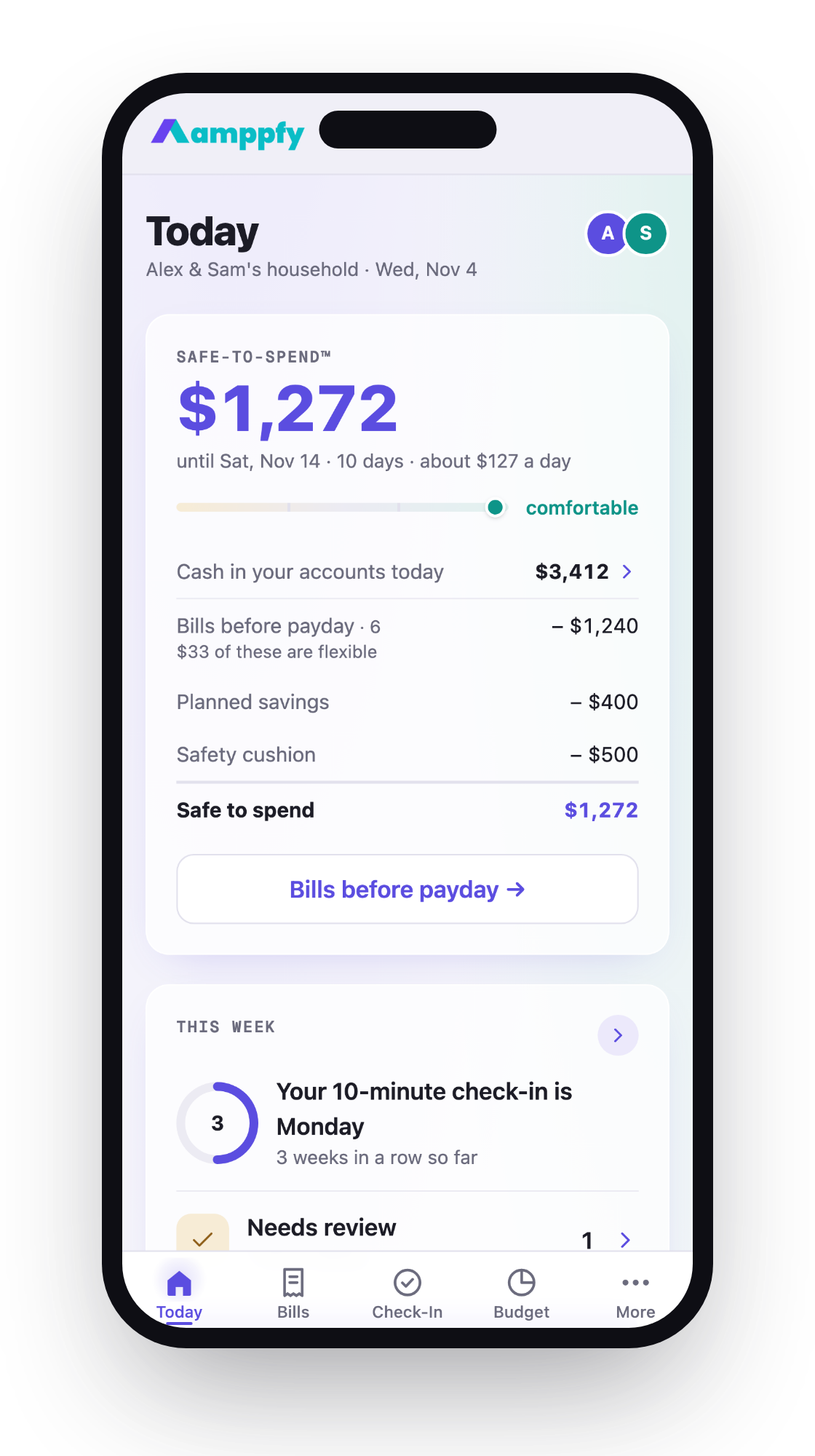
Here’s the arithmetic. Say $1,850 arrives on the third Wednesday. Before your next deposit, you’ll pay rent of $900, utilities of $140, and a phone bill of $55. You also want $100 for savings and a $150 cushion.
- Available cash: $1,850
- Minus bills due before next payment: $1,095
- Minus planned savings: $100
- Minus cushion: $150
- Safe-to-Spend™: $505
That $505 is the real number. Your bank balance will say $1,850 for a few days, which looks bigger than it is.
Monthly benefits make this more important, not less. A single payment has to cover four or five weeks. Spending freely in week one can leave a short week four. If you subtract the bills first, the rest of the month gets calmer.
This is also why direct deposit beats paper. Social Security reports that paper checks are 16 times more likely to be lost, stolen, altered, or returned than electronic payments. A predictable deposit date lets you plan around a fixed day.
For the full walkthrough of every route (employer form, your bank’s pre-filled form, or a government payment), see how to set up direct deposit.
FAQ
Can I set up direct deposit for SSI online?
No. Online changes in my Social Security cover retirement, survivors, and disability benefits only (as of October 2026). For SSI, call 1-800-772-1213, ask your bank about ENR, or visit a field office.
I still get a paper check. How do I switch?
Paper-check recipients can enroll through Treasury’s Go Direct, including for Direct Express. If you face real barriers, such as living somewhere without access to a bank, you can request a waiver through the U.S. Treasury.
Can my benefit go into two accounts?
Social Security sends it to one account only. Your bank can split it after it arrives, for example $200 to savings and the rest to checking.
When does a bank change take effect?
Online, you choose the effective date yourself. Whatever date you pick, keep the old account open until the first payment shows up in the new one.
The steps for setting up direct deposit for your Social Security benefit come down to a few checks: have your numbers ready, pick a method, confirm the details, and keep the old account open during any switch. After that, the deposit arrives on schedule.
When it lands, pay the bills due before your next payment first. Whatever remains is the money you can actually use. Amppfy, a free app for iPhone, Android, and the web, shows that number with the math underneath. Take ten minutes this week to add your payment dates and bills, and you’ll see your real number the morning the deposit arrives.