Most bills don’t arrive as one tidy pile. Rent leaves on the 1st, the car payment on the 12th, and a streaming charge you forgot about lands on the 23rd. Each one is ordinary. Together, they make it hard to say what’s actually free to spend this week.
A bill organizer fixes that. Some do it with reminders, some with bank sync, and some with a calendar that shows how the month plays out. This guide compares free and paid options side by side, using facts from each company’s own site where they publish them. It also covers what each one actually tracks, so you can pick the tool that fits how you and your partner already handle money.
You don’t need a perfect system. You need one you’ll still open in three weeks.
What a bill organizer actually has to do
Strip away the features and a bill organizer has four jobs. If an app misses one, you end up doing that job yourself.
- Know what’s due. Every recurring bill, with its amount and due date, sits in one place.
- Know when. Dates matter more than totals. A $1,400 rent payment on the 3rd affects you differently than the same amount on the 28th.
- Tell you before it happens. A heads-up the day before beats a notice after the charge clears.
- Roll forward. When a bill is paid, next month’s copy should appear without you retyping it.
Two more jobs matter for many households. If you share bills with a partner, both of you should see the same picture without one person becoming the family bookkeeper. If you have subscriptions, they belong on the list too, with next-charge dates.
Notice what’s not on the list: detailed spending categories, investment tracking, or credit scores. Those can be useful. They’re just a different tool. A lot of people quit budgeting apps because the upkeep grew larger than the problem they were trying to solve.
So when you look for the best free bill organizer app, judge it on those four jobs first. Everything else is extra.
The options
Here’s how five common choices compare. Prices and policies are listed as of October 2026. Where a company publishes its price on its own site, check there before you sign up, since prices change.
| App | Price | Platform | Bank login needed | Reminders | Shared with a partner |
|---|---|---|---|---|---|
| Amppfy | Free (as of October 2026) | iPhone, Android, web | No: you type in balances | Yes: heads-up the day before a bill | Yes: partner invite, private accounts stay private |
| Rocket Money (free tier) | Free; Premium $7 to $14 a month, pay what you think is fair (as of October 2026)[2] | iPhone and Android; web on paid tiers | Yes, in practice (via Plaid)[1] | Tracks upcoming bills and subscriptions | Premium only: a second login for one partner |
| Google Calendar | Free (as of October 2026) | Web, iOS, Android | No | Yes: reminders only | Yes, via a shared calendar[6] |
| Monarch Money | $14.99 a month or $99.99 a year, 7-day free trial (as of October 2026)[3] | Web, iPhone, Android | Yes: built around linking accounts | Bills and subscriptions on one calendar; alerts not stated on its site | Yes: invite a partner at no extra cost[4] |
| YNAB | $14.99 a month or $109 a year, 34-day free trial with no card needed (as of October 2026)[5] | Web, iPhone, Android | Optional: direct import or manual entry | Scheduled transactions show upcoming bills; no bill alert stated on its site | Yes: YNAB Together, up to six people |
Every cell comes from the company’s own site, and those pages are listed in the sources at the end. Where a detail isn’t published there, the cell says so rather than guessing. One simple reminder-style app was considered and left out for the same reason: its own site didn’t publish enough to fill the row honestly.
Each option in two paragraphs
Amppfy
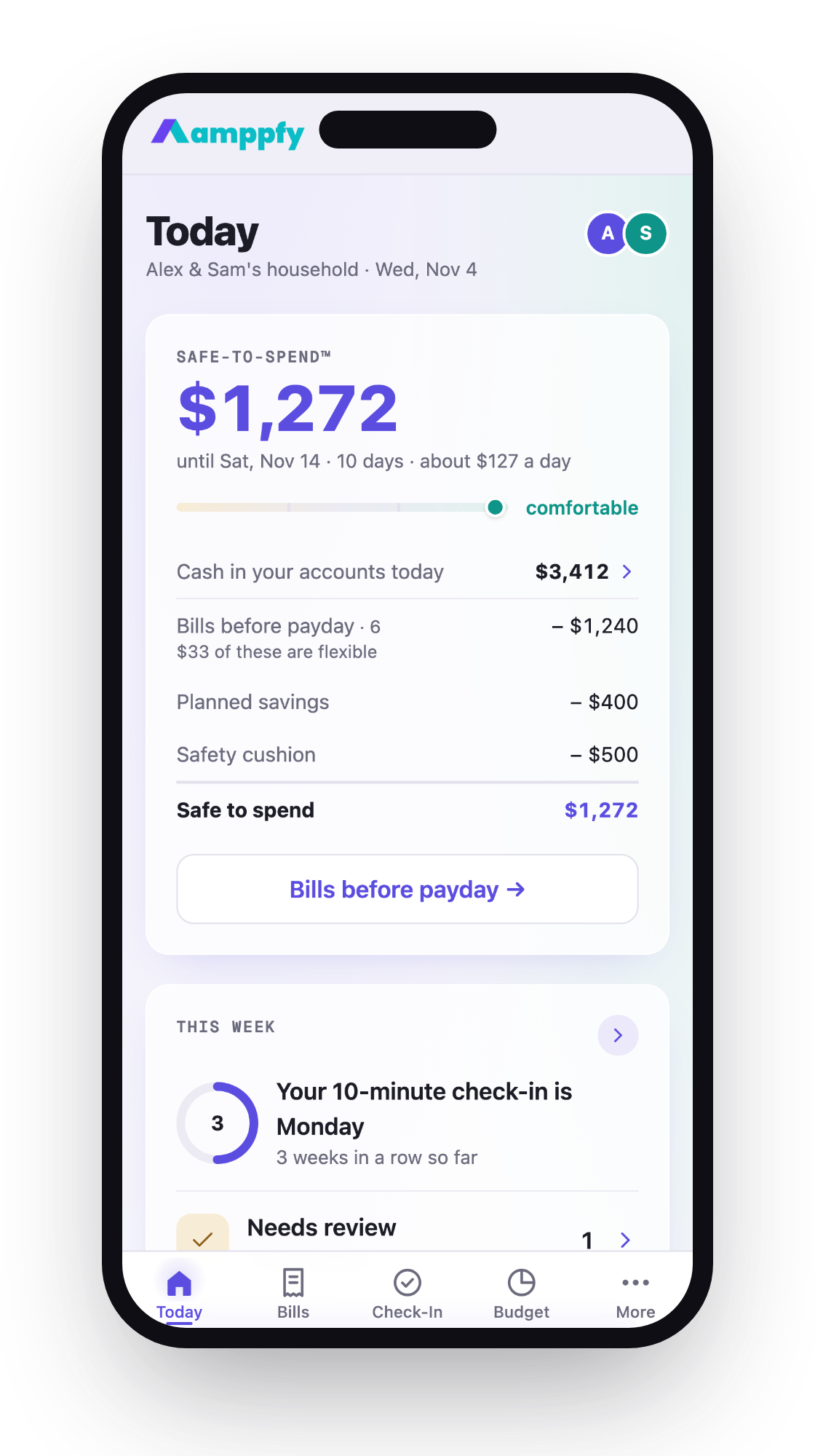
It’s free on iPhone, Android, and the web, and the same account works on all three. There’s no bank login and no transaction import. You type in your balances, bills, and paydays yourself, which takes about 30 seconds per account. Bills roll forward on their own, and a month calendar marks the lowest-cash day before payday.
You get a heads-up the day before a bill, and a weekly 10-minute check-in keeps the numbers fresh. A partner can join with their own login and see the same Safe-to-Spend™ number while private accounts stay private. It runs on iPhone, Android (Google Play), and the web, so a partner on either phone has an app. The tradeoff is clear: because nothing syncs, the numbers are only as current as your last check-in.
Rocket Money (free tier)
Rocket Money’s free tier tracks upcoming bills and subscriptions. It does this by linking your bank accounts through Plaid[1] and detecting recurring charges, so you don’t enter bills by hand. The free tier runs on iPhone and Android; web access comes with the paid tiers. Premium costs $7 to $14 a month, and you pick what you think is fair (as of October 2026)[2].
The appeal is low setup. The catch is that a bank login, through Plaid, is required in practice. If you’ve had bank sync break before, or you’d rather not connect accounts, that’s the deciding factor. It’s a good fit if you want detection more than control.
Google Calendar
Google Calendar is free, and you probably already have it. Create a repeating event for each bill, add a reminder, and you’re done. A shared calendar lets a partner see the same dates.
It only reminds. It doesn’t know your balance, so it can’t tell you whether a bill will fit. It’s an honest, ordinary tool for people who mostly forget dates rather than run short.
Monarch Money
Monarch Money is a paid app: $14.99 a month or $99.99 a year, with a 7-day free trial, as of October 2026[3]. It’s built as a broader money tool rather than a bill-only organizer. It syncs with your accounts, detects recurring subscriptions, puts bills and subscriptions on one calendar, and lets you invite a partner at no extra cost[4].
If you want one place for budgets, accounts, and goals and you’re fine paying for it, look at its site. If you only need bills handled, it may be more than you need.
YNAB
YNAB is also paid: $14.99 a month or $109 a year, with a 34-day free trial that doesn’t ask for a card, as of October 2026[5]. You can import from your bank or enter everything by hand, and YNAB Together lets up to six people share one subscription. It’s built around a specific budgeting method, and people who like it tend to really like it.
That method asks for regular attention. If you left a budgeting app because of upkeep, keep that in mind before you start a trial.
For a longer look at reminder-focused tools, see this guide to bill tracker apps that help you never miss a due date.
What a calendar shows that a list does not: the lowest point before payday
A list tells you how much. A calendar tells you when. That difference is where most “how am I short?” moments come from.
Try the arithmetic. Say you start the month with $1,000. You’re paid $1,500 on the 5th and again on the 19th. Your bills:
- Rent, $1,400, due the 3rd
- Car payment, $350, due the 12th
- Utilities, $250, due the 18th
- Phone, $100, due the 25th
As a list, the month looks fine. Total in: $1,000 + $1,500 + $1,500 = $4,000. Total out: $2,100. That leaves $1,900. No problem.
Now walk it by date:
| Date | Event | Balance |
|---|---|---|
| 1st | Start | $1,000 |
| 3rd | Rent, -$1,400 | -$400 |
| 5th | Payday, +$1,500 | $1,100 |
| 12th | Car, -$350 | $750 |
| 18th | Utilities, -$250 | $500 |
| 19th | Payday, +$1,500 | $2,000 |
| 25th | Phone, -$100 | $1,900 |
The month ends at $1,900, same as the list. But on the 3rd, the balance dips to -$400. That’s the lowest point before payday, and the list never showed it.
This isn’t a reason to worry. It’s a reason to look. Once you can see the dip, the fix is calm and simple: move rent’s autopay to the 5th, shift a little cash ahead of time, or ask about changing a due date. A calendar with the lowest day marked turns a surprise into a decision you make two weeks early.
How to set one up in 15 minutes
Pick any tool from the table. These steps work for all of them, and they fit in a coffee break.
| Step | Action | Time |
|---|---|---|
| 1 | Open your bank app and note each account’s current balance. | 2 min |
| 2 | List every recurring bill: name, amount, due date. Check last month’s statement for anything you missed. | 5 min |
| 3 | Add your subscriptions with their next-charge dates. | 3 min |
| 4 | Enter your next two paydays and the amounts. | 1 min |
| 5 | Turn on reminders for the day before each bill. | 2 min |
| 6 | Look at the month view. Find the lowest day before your next payday. | 1 min |
| 7 | Invite your partner, or share the calendar. | 1 min |
That’s 15 minutes. If you use a bank-linked app, steps 1 through 3 may fill in on their own, and you’ll spend the time checking what it detected instead.
Then pick a weekly slot. Ten minutes on the same day each week is enough: update balances, mark what’s paid, glance at the lowest point. Small and steady beats a big Sunday cleanup.
FAQ
Is there a truly free bill organizer with no bank login?
Yes. Google Calendar is free and needs no bank login, though it only reminds you. The first row of the table is free on iPhone, Android, and the web, and you type in balances yourself, so no bank connection is involved.
Do I need bank sync to stay organized?
No. Sync saves typing, but it can break and needs a bank login. Manual entry takes a few minutes a week and keeps you aware of the numbers. Pick whichever you’ll actually keep doing.
Can my partner and I use the same bill organizer?
Most options support this in some form. A shared Google Calendar shows the same dates. Some apps give each partner a separate login. Check each company’s own site for how it handles shared and private accounts.
What’s the difference between a bill organizer and a budget app?
A bill organizer focuses on what’s due and when. A budget app usually plans spending by category too. If bills are your main stress, start with the smaller tool. You can always add more later.
Choosing the one you’ll keep using
The best bill organizer app free or paid is the one that fits your week. If you mostly forget dates, a calendar with reminders covers it. If you want bills detected for you and don’t mind a bank login, a synced app does that. If you want to see the lowest point before payday and share it with a partner, look for a calendar view and a partner invite.
Whatever you choose, judge it on the four jobs: what’s due, when, a heads-up first, and bills that roll forward. Then give it 15 minutes this week to set up and ten minutes each week after.
If the calendar approach sounds right, you can set up your bills and paydays in Amppfy and see your Safe-to-Spend™ number with the math printed underneath. Once the lowest day is on the screen, it stops being a surprise.