At $14.99 a month, YNAB leaves plenty of people asking the same question: is there a free alternative that still helps me plan ahead? Not just a spending tracker, but something that shows what’s actually safe to spend before your next paycheck. The good news is several solid options exist, each with a different approach. Some use spreadsheets, some use envelopes, and one just shows you a single number. The right pick depends on how much time you want to spend and whether a partner needs access too.
Why People Look for a YNAB Alternative
YNAB works. That’s not the issue. The issue is the cost, the upkeep, or both.
YNAB costs $14.99 per month or $109 per year (as of October 2026), with no free tier after its 34-day trial. Compared with free personal budgeting tools, that subscription can feel like it defeats the purpose for a household watching every dollar. And if your subscription ends, you lose access to your plan inside the app until you resubscribe.
The second reason is time. YNAB’s “give every dollar a job” method asks you to categorize transactions regularly, reconcile accounts, and adjust categories when you go over. That’s powerful if you stick with it. But many people don’t. They set it up on a Sunday afternoon, keep it going for six weeks, and then stop opening the app. The budget goes stale. Guilt follows.
Bank connection issues are another trigger. YNAB offers direct import for select banks, and like any linked connection, it can stop updating and need to be reconnected. Every fix is time you’re not spending on the budget itself.
So you’re paying a subscription, spending time fixing connections, and wondering if the effort is worth it. That’s why people start searching for free YNAB alternatives that still do the core job: telling you what’s safe to spend.
What to Look for in a Replacement
Not every budgeting app replaces YNAB equally. Before you pick one, figure out what you actually used YNAB for. Most people used it for one or two core things, not all of its features.
Here’s what matters most in a replacement:
- Forward-looking math. A good alternative doesn’t just show where money went. It shows what’s left after upcoming bills, savings, and a buffer. That’s the whole point of planning ahead.
- Low weekly effort. If upkeep eats a chunk of every weekend, you’ll stop using it. Look for something that stays current without constant fiddling.
- Partner access. If two people share bills, both need to see the same numbers. Check whether the app supports a second user and how privacy works.
- Data you control. Spreadsheet tools let you export anytime. Some apps lock your data behind a subscription. Know the difference before you commit.
- No required bank login. Manual balance entry is quick once it’s a habit. It’s more private, and there’s no connection to break. Some people prefer this over sync.
One more thing to consider: do you need transaction-level categorization, or do you just need to know your safe spending number? YNAB does both. Most free tools do one or the other well, not both. Be honest about which one actually kept you on track.
The Alternatives, Compared
Here are four options worth considering, three free to use and one with a one-time price, each with a different philosophy. Prices and features are as listed on each company’s own site as of October 2026.
| Feature | Goodbudget (Free) | Aspire Budgeting | Buckets | Amppfy |
|---|---|---|---|---|
| Cost | Free (Premium $10/mo or $80/yr) | Free core sheet (Turbo add-on $5/mo) | Untimed free trial, then $64 once | Free |
| Method | Envelope budgeting | Zero-based envelope spreadsheet | Envelope budgeting (or your own style) | Safe-to-Spend™ number |
| Platform | iPhone, Android, web | Google Sheets (Aspire Mobile with Turbo) | macOS, Windows, Linux; mobile apps for iOS (TestFlight) and Android | iPhone, web |
| Partner access | Share a budget across household devices (2 devices on free) | Share the Google Sheet | One license covers family members in your home | Invite a partner by email |
| Bank connections | Premium only (US banks); file import (QFX/OFX/CSV) | No; CSV import with Turbo | Optional: file import, SimpleFIN Bridge | No |
Goodbudget
Goodbudget’s free plan gives you 10 regular envelopes plus 10 more, one account, two devices, a year of history, and debt tracking. You fill envelopes with planned amounts each pay period, then record spending. It’s a close match to YNAB’s “give every dollar a job” idea without a subscription. The limitation: 20 envelopes and one account can feel tight. Premium ($10 a month or $80 a year) adds unlimited envelopes and accounts, five devices, seven years of history, and automatic bank sync for US banks.
Aspire Budgeting
Aspire runs inside Google Sheets. The core spreadsheet is free, and the current version (v4.0) brought a refreshed dashboard and upgraded reports. An optional Turbo add-on ($5 a month) adds CSV import, auto-categorization, recurring expense tracking, and Aspire Mobile. You own your data completely, and Aspire never asks for your bank credentials. The trade-off is setup time: configuring a spreadsheet budget takes longer than opening an app.
Buckets
Buckets uses an untimed free trial with a one-time purchase of $64 if you decide to keep it, and one license covers your family members’ computers at home. It runs on macOS, Windows, and Linux and keeps your finances on your computer. Mobile apps exist for iOS (through TestFlight) and Android, and bank sync is optional through file imports or SimpleFIN Bridge. It’s a good fit if you want to pay once and keep your data local.
Amppfy
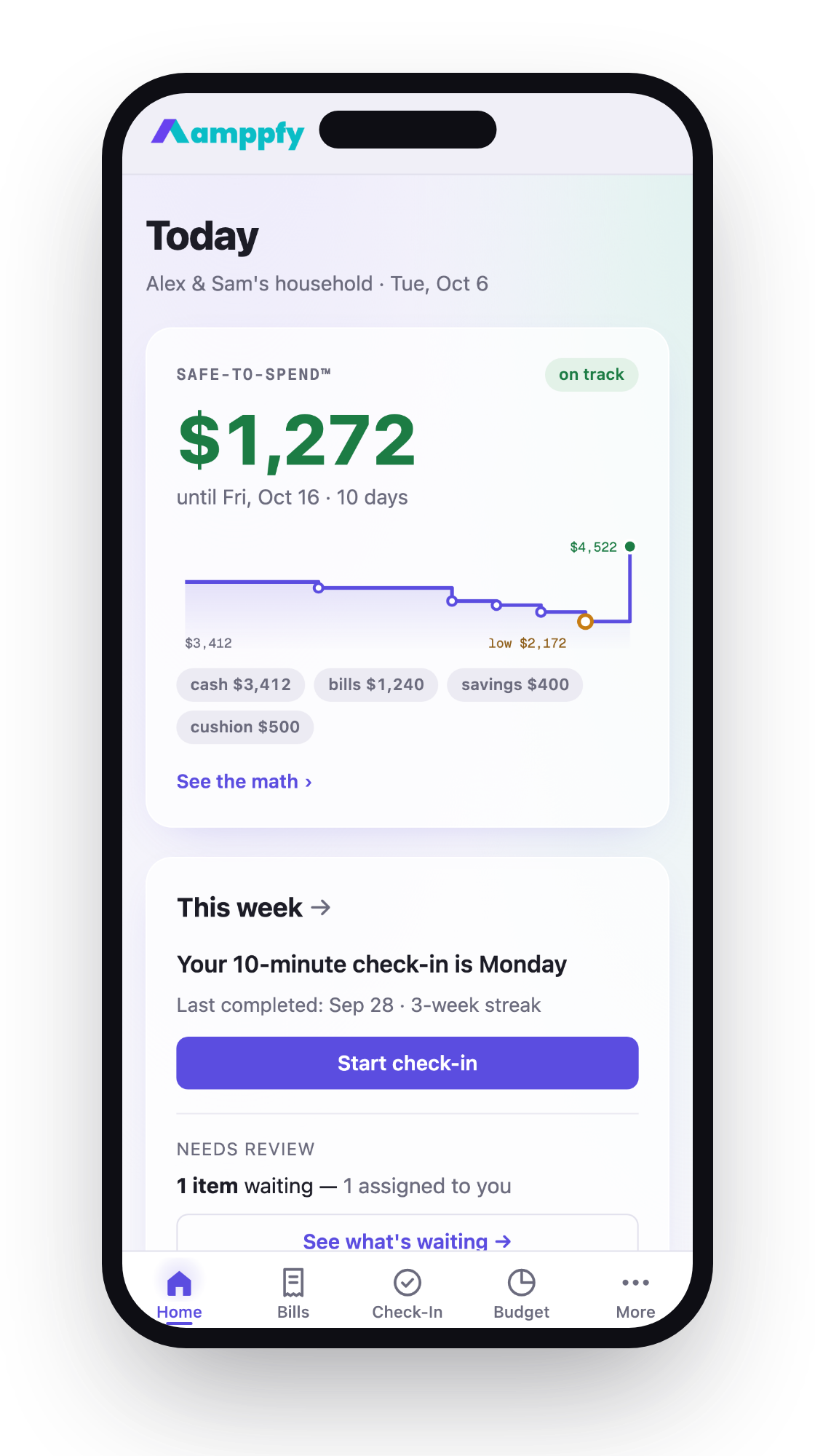
This one takes a different approach. You enter your balances, bills, paydays, and savings goals by hand, with no bank login: about 30 seconds per account to type in a balance, and about ten minutes to set up. It shows one Safe-to-Spend™ number: your cash, minus bills due before payday, minus planned savings, minus a cushion you pick. The four lines of math sit right under the number. It also has a Budget page that shows the month as four slices, a net worth page, and you can invite a partner by email. Each of you gets your own login, and anything you keep private stays private. It’s free on iPhone and the web, with no paid tier. It doesn’t import transactions, so you won’t get spending breakdowns by category.
Which One Fits Which Household
The right pick depends on your situation, not on which app has the most features.
- Couples sharing bills need partner access that doesn’t require sharing a password. Goodbudget shares one budget across household devices. Amppfy lets you invite a partner by email so you both work from the same Safe-to-Spend™ number. Aspire works if both people are comfortable editing the same Google Sheet.
- Single parents on a tight schedule need the lowest possible time commitment. A quick balance update beats a long categorization session. Tools that show one number (what’s safe to spend) tend to win here over tools that ask you to sort transactions.
- Spreadsheet people who want full control and don’t mind setup time will like Aspire. You can customize every formula and build your own reports. It’s flexible, but it asks the most of you.
- People who quit YNAB because of upkeep should look for the simplest possible system. If you stopped opening YNAB, you won’t suddenly enjoy a complex spreadsheet. Pick something that answers one question (how much can I spend?) and skip the rest.
- Desktop-first budgeters who want to pay once and be done should look at Buckets. No subscription, and your data stays on your computer.
There’s no single best free YNAB alternative. There’s only the one you’ll actually use next Friday when your paycheck hits.
How to Switch Without Losing Your History
Leaving YNAB doesn’t mean starting from zero. Here’s how to carry your data forward and get set up.
- Export from YNAB first. In the YNAB web app, export your plan and transaction data as files (export is web-only). Do this before your subscription ends. Once it expires, you lose access to your plan until you resubscribe.
- Save your category structure. Screenshot or write down your YNAB categories and their current balances. This gives you a reference point, even if your new tool uses different names.
- Pick your new tool and set up the basics. Enter your current account balances, your next payday, and your recurring bills. A spreadsheet like Aspire takes longer to set up than an app.
- Don’t try to import everything. Your YNAB history is useful as a reference, not as a live dataset. Keep the CSV on your computer. Start fresh in the new tool with today’s balances.
- Run both tools for one pay cycle. Use your new tool as the primary system but keep checking YNAB (if your subscription is still active) for one cycle. This builds confidence without risk.
The biggest mistake people make is trying to recreate their entire YNAB setup in the new tool. You don’t need 47 categories. You need to know what’s safe to spend before payday. Start there. Add complexity later if you miss it.
Frequently Asked Questions
Is there a truly free budgeting app that works like YNAB?
No free app replicates YNAB’s full feature set: zero-based budgeting, bank import, goal tracking, and detailed reports all in one. But several free tools handle the core job of planning ahead. Goodbudget offers envelope budgeting for free with some limits. Aspire gives you a zero-based spreadsheet at no cost. The manual-balance app above shows a single Safe-to-Spend™ number that accounts for upcoming bills and savings. Each covers a piece of what YNAB does, just not all of it in one place.
Will my bank data be safe if I switch to a free app?
The free tiers listed here don’t require a bank connection. Goodbudget Free, the Aspire core sheet, and the manual-balance app all work with numbers you enter yourself, so no credentials are stored with a third party and no connection can break. (Goodbudget Premium and Buckets offer optional bank sync if you want it later.) The trade-off is that you update balances yourself.
Can I use a free alternative with my partner?
Yes, but the method varies. Goodbudget’s free tier syncs one budget across two devices. Aspire lets you share a Google Sheet. The manual-balance app lets you invite a partner by email so you both see the same number. A Buckets license covers family members in your home.
What happens to my YNAB data if I cancel?
You lose access to your plan once your subscription expires, though YNAB says it keeps most account data for up to 24 months in case you resubscribe. Export your plan and transactions from the web app before canceling. Save those files somewhere you control: a computer folder, Google Drive, wherever works for you.
Pick the Tool You’ll Actually Open
The best budgeting app is the one that’s still open on your phone three months from now. YNAB works well for many people, but if the price or the upkeep pushed you away, a simpler system might stick better. Match the tool to your real habits, not your ideal habits.
If you want to see your own Safe-to-Spend™ number before your next payday, Amppfy is free on iPhone and the web. Enter your balances, bills, and payday once, then update the balances when they change. Get the app free and see what’s actually safe to spend this week.