EveryDollar is built around one idea: give every dollar a job. That approach doesn’t suit everyone. Maybe the premium price stings. Maybe the app feels like homework. Maybe you share finances with a partner and the workflow doesn’t fit two people. Whatever the reason, you’re here because you want something different, and there are solid options worth your time.
Plenty of people budget without any budgeting app at all. That tells you something: the right tool matters more than the right method. If your current app creates friction, you’ll stop using it. Finding an EveryDollar alternative that matches how you actually live is worth a few minutes of research.
Why People Look for an EveryDollar Alternative
EveryDollar’s free version lets you build a zero-based budget and enter transactions by hand, but connecting your bank is a Premium feature. Premium costs $17.99 a month or $79.99 a year after a 14-day trial, as of October 2026. That cost adds up over a year. For households already watching every dollar, paying for a budgeting app feels like a contradiction.
The zero-based method itself can also be the problem. Assigning every single dollar to a category works well for debt payoff: one analysis from Pepperdine’s business school notes that zero-based budgeting creates “clear boundaries” by assigning every dollar a specific category[1], which helps people on tight budgets. But if you’re past the debt-payoff phase, that level of detail can feel exhausting. You don’t need 14 categories. You need to know what’s safe to spend before Friday.
Bank sync is another sore spot. Bank connections in any app can break without warning. If you’ve lost hours re-linking accounts, you already know this pain.
Couples run into friction too. EveryDollar does have a household feature that lets two people manage one budget with separate emails, but if one partner ends up doing all the data entry, the other checks out. That’s not a budgeting system: it’s a chore assigned to one person.
What to Look for in a Replacement
Before you compare feature lists, ask yourself three questions. How many minutes a week will you actually give this? Do you share money with someone? And what single number would calm you down about money?
Your answers shape everything. Here’s what to weigh:
- Time commitment: Some apps want daily categorization. Others need a quick weekly check-in. Pick the one that matches your actual patience, not your aspirational patience.
- Couples support: If you split bills or share accounts, you need an app where both partners see the same picture without doubling the work. Check whether you can invite a partner into the same household view.
- The core question it answers: Some apps answer “where did my money go?” Others answer “what can I safely spend right now?” Those are different questions. Know which one keeps you up at night.
- Bank sync vs. manual entry: Automatic imports save time until they break. Manual entry takes a little effort but has no connection to break. Decide which tradeoff you prefer.
- Price: Free tools exist. The paid apps in this article run from $10 to $17.99 a month on monthly billing, less if you pay yearly. A $100/year budgeting subscription only makes sense if it saves you more than $100 in better decisions.
Don’t chase features you won’t use. A simpler app you open every week beats a powerful app you abandon by March.
The Alternatives, Compared
Here’s a side-by-side look at common options people consider after leaving EveryDollar. Prices are as of October 2026; check each app’s own site before signing up.
| Feature | EveryDollar | YNAB | Goodbudget | Monarch Money | Amppfy |
|---|---|---|---|---|---|
| Method | Zero-based | Zero-based | Envelope | Flexible category budgets | Safe-to-Spend™ number |
| Free tier | Yes (manual entry); 14-day Premium trial | No; 34-day trial | Yes (limited envelopes, 1 account) | No; 7-day trial | Yes |
| Paid price | Premium $17.99/mo or $79.99/yr | $14.99/mo or $109/yr | Premium $10/mo or $80/yr | Core $14.99/mo or $99.99/yr | Free |
| Bank sync | Premium only | Optional | Premium only (US banks) | Yes | No (manual entry) |
| Couples | Household budget, separate emails | YNAB Together, up to six people | Shared budget synced across devices | Invite a partner at no extra cost | Invite a partner by email |
| Platforms | iOS, Android, Web | iOS, Android, Web | iOS, Android, Web | iOS, Android, Web | iPhone, Web |
YNAB
YNAB is close to EveryDollar in philosophy: give every dollar a job. One difference is YNAB’s “age your money” rule, which aims to have you living on money you earned last month. It suits people who want granular control, and bank import is optional. There’s a learning curve. It costs $14.99 a month or $109 a year after a 34-day trial, and YNAB Together lets up to six people share one subscription.
Goodbudget
Goodbudget uses the envelope method digitally. You fill virtual envelopes at the start of each period and spend from them. On the free plan you enter transactions yourself or upload a bank file; Premium adds automatic bank sync for US banks. The free plan gives you 10 regular envelopes plus 10 more and one account, which can be enough for a simple household. It’s a good fit if you like the hands-on feel of cash budgeting without physical cash.
Monarch Money
Monarch is the data-rich option. It connects to your accounts, tracks spending by category, and shows net worth and investments. A subscription is required after a 7-day trial, and you can invite a partner at no extra cost. If you like seeing charts and trends, Monarch fits.
Amppfy
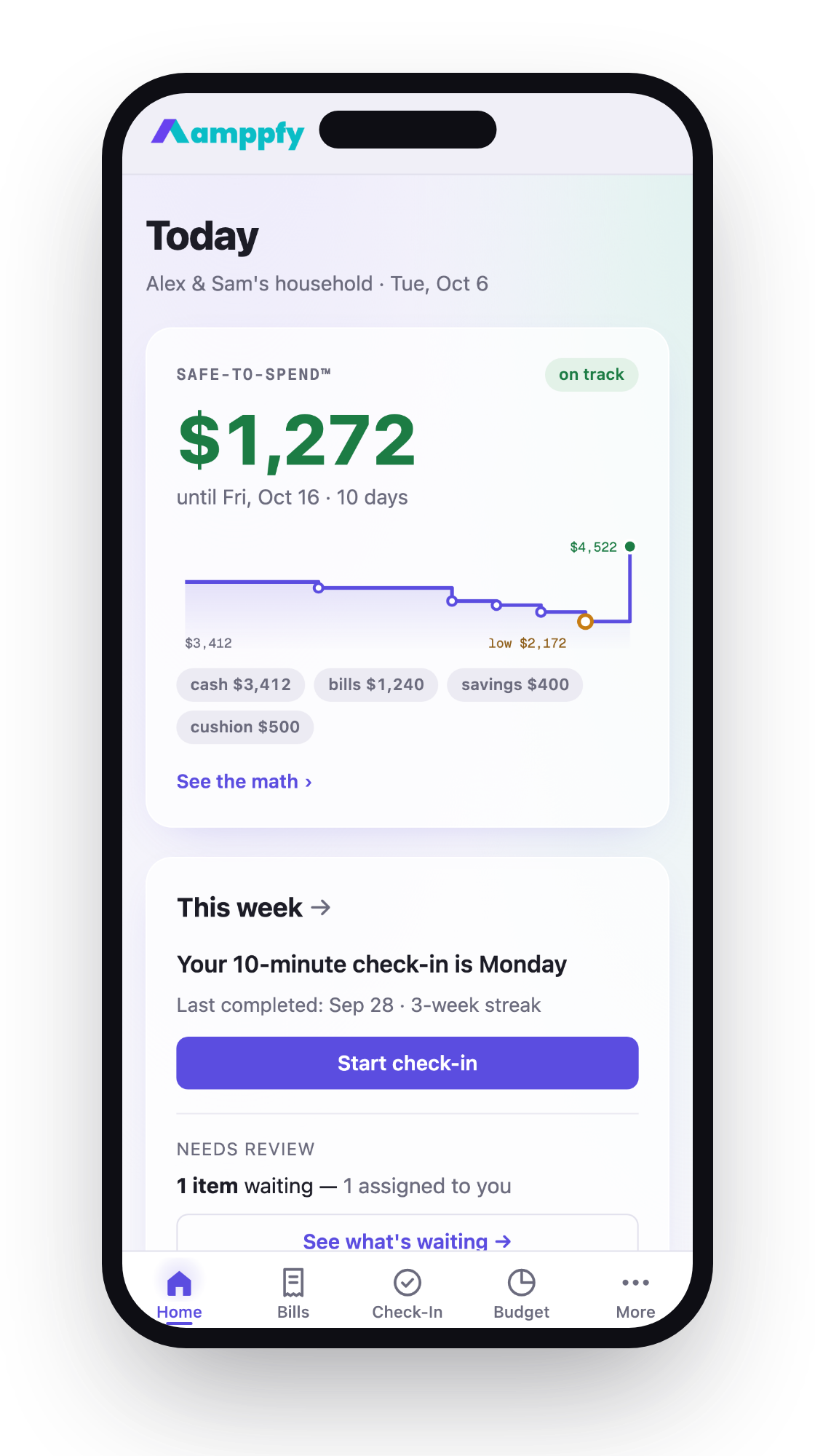
It takes a different approach entirely. Instead of categorizing every purchase, it shows one Safe-to-Spend™ number: your available cash minus bills due before payday, minus planned savings, minus a cushion you set. The math is always visible. You enter balances yourself, no bank login needed. You can invite a partner by email to see the same number. It’s free on iPhone and the web. It won’t import transactions, so it’s not for people who want spending reports. It’s for people who just want to know what’s safe to spend right now.
Which One Fits Which Household
The right app depends on your household, not on a star rating. Here’s a quick guide:
- Paying off debt aggressively: YNAB or EveryDollar’s paid tier. Zero-based budgeting creates the boundaries you need during payoff mode.
- Couple with shared bills but separate spending money: Amppfy. Invite your partner by email and you each get your own login, with one Safe-to-Spend™ number between you. No one has to categorize the other person’s coffee.
- Data-driven planner who wants charts: Monarch Money. You’ll get net worth tracking, spending trends, and investment snapshots all in one place.
- Cash-envelope fan going digital: Goodbudget. It mirrors the envelope method without the zippered pouch in your purse.
- Burned out on budgeting apps entirely: Start with the simplest option you can find. If typing in a few balances once a week (about 30 seconds per account) sounds doable, try that before committing to a monthly subscription.
Single parents juggling tight schedules should prioritize low time commitment above all else. An app that takes 30 minutes a week won’t survive your Tuesday night. One that takes ten minutes on Sunday morning might.
Your tool doesn’t need to be fancy. It needs to be the one you’ll actually open.
How to Switch Without Losing Your History
Leaving one budgeting app for another feels risky. You’ve built months of data. Here’s how to make the move clean:
- Export what you can. EveryDollar Premium lets you export your budget data as a CSV file. Do this before you cancel any subscription. Save the file somewhere you won’t lose it: a cloud folder works fine.
- Screenshot your current month’s budget. You want a record of your category amounts, not just transactions. This becomes your setup cheat sheet in the new app.
- Set up the new app on a payday. Starting fresh on payday gives you a clean cycle. Enter your current balances, upcoming bills, and any savings goals. Do it in one sitting.
- Run both apps for one pay cycle. Don’t cancel the old one yet. Use the new app as your primary tool for two weeks. If it sticks, you’ll know. If it doesn’t, you haven’t lost anything.
- Cancel the old subscription only after you’ve completed one full cycle in the new app. Check for auto-renewal dates so you don’t get charged again.
Your old data isn’t wasted just because it lives in a CSV file. The spending patterns you learned still inform your decisions. What matters going forward is whether your new tool answers the question you actually care about: can I spend this, or not?
Frequently Asked Questions
Is zero-based budgeting the only effective method?
No. Zero-based budgeting works well for debt payoff and tight budgets because it assigns every dollar a role. But other approaches, like envelope budgeting or a single safe-to-spend number, can be just as effective for people who are past the payoff stage and want less maintenance. The best method is the one you’ll follow consistently.
Do I need bank sync in a budgeting app?
Not necessarily. Bank sync saves time on transaction entry, but it can break when your bank updates its systems. Manual entry takes a little typing and doesn’t depend on a bank connection. If you check your bank app daily anyway, typing in a balance is fast.
Can couples use these apps without sharing every financial detail?
Yes, and apps handle it differently. EveryDollar’s household feature and YNAB Together share one full budget. Monarch lets you invite a partner at no extra cost. In the Safe-to-Spend™ app in the table, each partner has their own login; shared accounts and bills show for both, and anything you keep private stays private. Pick the level of transparency that fits your relationship.
What if I’ve already tried and quit multiple budgeting apps?
That’s common, and it usually means the apps asked too much of you, not that you’re bad with money. Look for the option with the lowest weekly time requirement. If you can commit to a short check-in once a week, start there. You can always add complexity later.
Your Next Step
The best alternatives to EveryDollar aren’t better because they have more features. They’re better because they fit your life. A debt-focused household needs different tools than a dual-income couple splitting rent. Match the app to your actual routine, not to someone else’s recommendation.
If your main question is “what can I safely spend before payday,” try seeing that number for yourself. Get Amppfy free on iPhone or the web: setup takes about ten minutes, a weekly check-in takes about ten more, and your Safe-to-Spend™ number is there when you need it.