

If you’ve checked your bank app three times this week and still can’t say what’s safe to spend before payday, you’re not alone. Free tools can help. But “free” means different things depending on who’s selling it.
The options have shifted too. Mint shut down in 2024, and plenty of people who relied on it went looking for a replacement. Many popular platforms now charge a subscription. If you’re searching for the best free budgeting app, the honest answer depends on how you handle money, who you share it with, and which phone is in your pocket.
What follows is plain: what each app gives you at no cost, where the limits sit, and who each one fits. Every app fact comes from the company’s own site or store listing, as of November 2026.
What a free budget app has to do
A free budget app has one job. It should tell you, at a glance, whether the money in your account is actually yours to spend. Charts and categories are nice. The real test is whether you can open the app on a Tuesday and know what’s left before payday.
Before you compare features, sort the apps by what “free” really means:
- Free plan with limits, plus a paid tier. You get a working version at no cost. Some features, like bank connection or extra accounts, sit behind a subscription.
- Free to download, with ads or in-app purchases. The app installs at no charge. Upgrades are sold inside the app.
- Free with no paid tier at all. Every feature is included. There’s nothing to upgrade to.
None of these is wrong. A free plan with limits can be plenty if you stay inside the limits. The point is knowing which type you’re installing, so a price change later doesn’t catch you off guard.
The free budget apps, compared
Here’s how six free options line up. Details are as of November 2026. “Not stated” means the company doesn’t publish that detail.
| App | Platforms | Free plan (what it includes) | Free plan limits | Bank linking | Partner sharing | Paid tier |
|---|---|---|---|---|---|---|
| EveryDollar | Computer, phone, tablet | Zero-based budget, manual entry | No bank connection | Paid only | Not stated | Premium: $79.99/year ($6.67/month) or $17.99/month; 14-day trial |
| Goodbudget | Web, Android, iPhone | Envelope budgeting, manual entry or file import | 10 regular + 10 more envelopes, 1 account, 2 devices, 1 year of history | None on Free; transaction import on Premium | Sync and share across household devices | Premium: $10/month or $80/year |
| Rocket Money | App stores, web login | Subscription tracking, custom budgets | Up to 2 custom category budgets | Required for most features | Not stated | Premium: $7 to $14/month (you choose the price on a slider); Premium+: $15/month |
| Fudget: Monthly Budget Planner | iPhone, Android | Simple income and expense lists | Not stated | None mentioned | Not stated | Fudget Plus: $4.99/month, $19.99/year, or $14.99 bi-yearly |
| Money Manager Expense & Budget | Android, iOS | Manual entry, category budgets, calendar | Not stated | None (manual entry) | Not stated | $2.49/month or $19.99/year |
| Amppfy | iPhone, Android, web | All features | None (no paid tier) | None | Partner invite; private accounts stay private | None |
Each free app in two paragraphs
EveryDollar offers “a free version you can use as long as you want.” You enter transactions by hand and give every dollar of income a job, which is the zero-based method. It runs on a computer, phone, or tablet.
Premium connects your bank and costs $79.99 billed annually (about $6.67 a month) or $17.99 monthly, with a 14-day trial. It fits you if you like the zero-based method and don’t mind typing in what you spend.
Goodbudget uses digital envelopes. The free plan gives you 10 regular envelopes plus 10 more, one account, two devices, and one year of history. You enter spending by hand or import a file. It syncs across household devices, so two people can share the same envelopes.
Premium is $10 a month or $80 a year. It adds unlimited envelopes and accounts, five devices, seven years of history, and transaction import. It fits couples who like the cash-envelope idea.
Rocket Money is “free to download, with optional Premium features.” There are three tiers: Free, Premium, and Premium+. The free tier covers subscription tracking and custom budgets, with up to two custom category budgets.
Most features depend on connecting your accounts. Premium+ costs $15 a month and includes bill negotiation. It fits you if subscriptions are your main leak and you’re comfortable linking accounts.
Fudget, from developer Danny Connell, keeps things plain: a list of income and a list of expenses. It’s free with in-app purchases. No bank linking is mentioned.
Fudget Plus costs $4.99 a month, $19.99 a year, or $14.99 bi-yearly. It fits you if you want a simple budget app that feels like a notepad.
Money Manager Expense & Budget, from Realbyte Inc., uses double-entry bookkeeping. You get a monthly budget per category, a calendar view, and receipt photos. Entry is manual.
It’s free with in-app purchases, and subscriptions run $2.49 a month or $19.99 a year. It fits detail-minded people who like to see where every transaction sits.
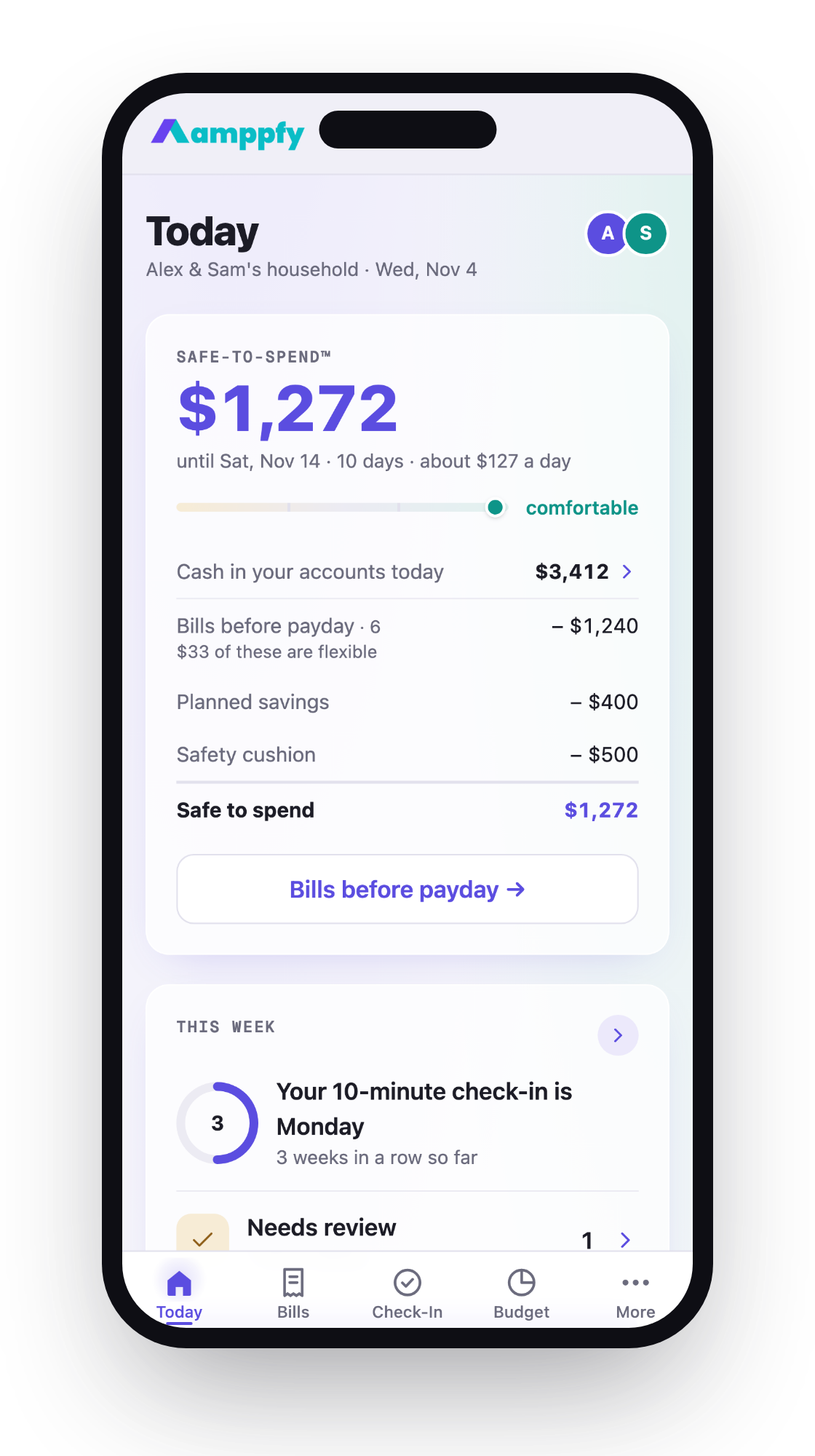
Amppfy is free on iPhone, Android, and the web under one account, with no ads and no paid tier. You type in balances, about 30 seconds per account. There’s no bank login and no transaction import. It shows one Safe-to-Spend™ number, with the math printed underneath:
- Cash: $3,412
- Minus bills before payday: $1,240
- Minus planned savings: $400
- Minus your safety cushion: $500
- Safe-to-Spend™: $1,272
A bills calendar marks your lowest point before payday. You also get a weekly check-in, heads-ups before bills, goals funded on payday, a home-screen widget, and a partner invite that keeps private accounts private. It fits you if you want one calm number instead of categories.
Budget apps that are not free, and when paying makes sense
Some well-known apps have no free plan. As of November 2026:
- PocketGuard: $12.99/month, $74.99/year, or $149.99 lifetime. 7-day trial. Web, iPhone, Apple Watch, Android.
- Monarch Money: $14.99/month or $99.99/year. iOS, Android, web.
- YNAB: $14.99/month or $109/year. 34-day trial, no credit card needed. iOS, Android, web, Apple Watch. Direct import for select banks.
Do the arithmetic before you sign up. A $14.99 monthly plan adds up to $179.88 over a year. Paying annually brings Monarch to $99.99 and YNAB to $109.
Paying makes sense in two cases. You want transactions imported and sorted for you automatically. Or you want a specific method, like YNAB’s, and you’ll actually open it every week. If neither describes you, a free option will likely cover what you need.
Free on iPhone vs Android vs web: what changes
For a mixed-phone household, one thing matters most. Can both of you use the same account on the App Store, Google Play, and the web? If one partner has an iPhone and the other has Android, an app that’s strong on only one platform won’t work for both of you.
Check the store listings before either of you enters a single number. Look for the same account on both stores, plus a web version for laptop days. Fudget and Money Manager list both stores. Goodbudget, Rocket Money, and Amppfy add the web as well.
Apple Watch support and home-screen widgets are handy. They’re extras, though, not the deciding factor. A widget won’t help if your partner can’t log in. If you’re on iPhone only, our roundup of free budget apps for iPhone goes further into that platform.
Choosing one for your household
Start with how you share money. Then match the app to it.
- Joint money, two phones: pick something both of you can open on your own device. Goodbudget’s free plan syncs two devices. Check partner features before you commit.
- Hybrid or separate money: look for shared views that keep personal accounts private.
- Single parent, tight weeks: a bills calendar that shows your lowest day before payday can be a steady anchor.
- You quit an app over upkeep or broken sync: consider manual entry. Typing balances takes less time than fixing a broken connection.
- Subscriptions are the problem: Rocket Money’s free tier is built for that.
Give any app two weeks. Spend ten minutes once a week updating it. If you can’t answer “what’s safe to spend before payday” by week two, try another one. Switching is cheap when the app is free.
FAQ
Which budget apps are completely free?
As of November 2026, among the apps here, only Amppfy has no paid tier at all. EveryDollar, Goodbudget, and Rocket Money offer free plans with limits. Fudget and Money Manager are free to download with in-app purchases.
Do free budget apps sell my data?
Read each app’s privacy policy before you sign up. That document is the only reliable answer. Amppfy states no ads and that your data is never sold.
Is a free app enough for a couple?
Often, yes. The key is that both of you see the same numbers on your own phones. Check device limits, partner features, and whether personal accounts can stay private.
Do I need bank linking?
No. Linking saves typing, but it can break and need fixing. Entering balances by hand takes about 30 seconds per account. You can compare budget apps without bank linking to see how that approach works.
Pick one and give it a week
Free budget apps come in three kinds: free plans with limits, free downloads with in-app purchases, and apps with no paid tier at all. Each one on this list fits someone. Envelope fans, zero-based planners, subscription trimmers, and people who just want one clear number all have a free option.
Choose by how your household shares money and which phones you carry. Then use it for ten minutes a week. A simple app you open every Sunday beats a full-featured one you forget about.
Holding an Android phone? The free budget apps for Android roundup goes deeper on that side.
If one clear number before payday sounds like what you need, try it this week. Enter your balances, bills, and payday once, about ten minutes, and your Safe-to-Spend™ is there whenever you glance at your phone or laptop. Get Amppfy free.