Close Menu

    Subscribe to Updates

    Get the latest creative news from FooBar about art, design and business.

    What's Hot

    Free Colorado Mortgage Calculator

    February 6, 2026

    Social Security Basics: When To Claim & How It Affects Your Plan

    February 6, 2026

    Free California Mortgage Calculator

    February 5, 2026
    Facebook X (Twitter) Instagram
    Amppfy
    • Personal Finance
      • Know Your Money
        • Money Quiz Reveals Financial Health
        • Living Paycheck to Paycheck
        • Key Personal Finance Metrics
        • How to Map Financial Goals
        • Calculate Debt-to-Income Ratio
        • Monthly Financial Review
        • Explore More Know Your Money Resources
      • Financial Literacy
        • Responsible Credit Card Use
        • How to Maximize Employer Benefits
        • Cashflow Calendar to Pay Bills
        • Build a Rainy Day Fund
        • Investing for Beginners with $100
        • How to Avoid Predatory Lenders
        • Explore More Financial Literacy Resources
      • Financial Wellness
        • Building Rainy Day Fund
        • Debt-Snowball vs. Debt-Avalanche
        • How to Maximize Savings
        • How to Plan for Major Purchase
        • Emergency Buffer While Paying Debt
        • How to Negotiate with Creditors
        • Explore More Financial Wellness Resources
      • Side Hustles
        • How to Make Money Online
        • Side Hustles That Fit Weeknights
        • Side Hustles for Busy People
        • How to Monetize a Hobby
        • Gig Economy Playbook
        • Freelance Pricing 101
        • Side Hustles Start this Weekend
        • Explore More Side Hustles Resources
    • Budgeting
      • Budgeting Tips
        • How to Set Up Savings Buckets
        • Financial Budget Repair Plan
        • Beginner’s Guide to Tracking Spending
        • Common Budgeting Mistakes
        • Best Budgeting Apps Compared
        • Zero-Based Budgeting
        • Explore More Budgeting Tips Resources
      • Money Management
        • How to Build a Monthly Budget
        • How to Create a Savings Plan
        • Clever Ways to Save $500 This Month
        • Smart Grocery Budgeting
        • Cut Recurring Costs
        • Cash Back and Couponing
        • Explore More Money Management Resources
      • Fix Cashflow
        • 52-Week Savings Challenge
        • Budget Repair for Ages 18–28
        • Family Budgeting
        • Master Money Management
        • Explore More Fix Cashflow Resources
      • Monthly Budget Calculator
    • Debt
      • Debt Free Journey
        • Payoff Strategies for Single Parents
        • How to Build Debt Payoff Calendar
        • Consolidating Debt
        • How to Plan for a Major Purchase
        • Debt-Repayment Fund for Loans
        • Debt Consolidation Pros and Cons
        • Explore More Debt Free Journey Resources
      • Debt Payoff
        • Debt Snowball vs Avalanche
        • Crush Debt Fast
        • How to Pay Off Credit Card Debt
        • Using a Balance Transfer Credit Card
        • Rolling Over 401(k) to Pay Down Debt
        • Paying Off Auto Loan Early
        • Explore More Debt Payoff Resources
      • Financial Freedom
        • Passive Income Ideas
        • Student Loans 101
        • How to Refinance Personal Loan
        • Taking Out a Personal Loan
        • When Bankruptcy Might be an Option
        • Explore More Financial Freedom Resources
    • Savings
      • Savings Tip
        • How to Rebuild Savings After Job Loss
        • 52-Week Savings Challenge
        • Smart Grocery Budgeting
        • Micro-Savings Strategies
        • Cash Back and Couponing
        • Cut Monthly Expenses
        • Explore More Savings Tip Resources
      • Emergency Fund
        • Emergency Buffer While Paying Down Debt
        • Park Your First $1,000 Emergency Fund
        • Emergency Fund Is Non-Negotiable
        • Sinking Funds vs. Emergency Fund
        • Emergency Funds
        • Explore More Emergency Fund Resources
      • Savings Goal
        • How to Build a Savings Plan
        • Short-Term Savings Goals vs Emergency Fund
        • How to Set Realistic Savings Goals
        • Micro-Savings That Add $50–$200 a Month
        • Cut Recurring Costs
        • Managing Savings During Recession
        • Explore More Savings Goal Resources
      • Savings Calculators
        • Savings Goal Calculator
        • Emergency Fund Calculator
    • Credit
      • Building Credit
        • Credit Utilization
        • Negative Marks on Credit Report
        • Pay Off Credit Card Debt
        • How to Read Credit Report
        • Building Credit as a Gig Worker
        • Knowing Credit Score Is Step One
        • Explore More Building Credit Resources
      • Credit Score
        • Truth About Credit Freezes
        • Credit Score 101
        • Improve Your Credit Score
        • How to Remove Negative Items
        • Understanding Credit Utilization
        • Leveraging Credit Score Improvements
        • Explore More Credit Score Resources
      • Credit Card
        • Credit Card Hacks
        • Best Rewards Credit Card
        • Lost or Stolen Credit Card
        • Rewards Credit Card
        • Balance Transfer Credit Cards
        • Starter Credit Cards
        • Explore More Credit Card Resources
    • Investing
      • Investing Tips
        • How to Make Money in Stocks
        • Bullish vs. Bearish
        • Roth IRA vs. Traditional IRA
        • Opening a Brokerage Account
        • How to Protect Stock Investments
        • How the Stock Market Works
        • Explore More Investing Tips Resources
      • Wealth Building
        • Investing for Beginners
        • How to Start Investing
        • How Call Options Work
        • How Do Stocks Function
        • Investing 101
        • Dividend Investing for Beginners
        • Explore More Wealth Building Resources
      • Investing Strategy
        • How to Build Retirement Portfolio
        • Index Funds vs. Actively Managed Funds
        • Target-Date Funds
        • How to Rebalance Portfolio
        • Investing Mistakes New Investors Make
        • Why the Price-to-Earnings Ratio Matters
        • Explore More Investing Strategy Resources
      • Stocks
        • How to Read Stock Charts
        • Best Stocks to Weather Inflation
        • Understanding Margin Calls
        • How to Short a Stock
        • What is Swing Trading
        • Beginner’s Guide to Put Options
        • Explore More Stocks Resources
    • Home
      • Home Buying
        • First-Time Homebuyer Checklist
        • How Much Down Payment to Buy a House
        • Renting vs. Buying
        • How to Estimate Homeownership Costs
        • Qualify as First-Time Home Buyers
        • Buying a Fixer-Upper House
        • Explore More Home Buying Resources
      • Real Estate
        • Smart Ways to Use Home Equity
        • Calculate Rental Property Cash Flow
        • Starting a House Hacking Strategy
        • Investing in Real Estate Owned Properties
        • REITs for Passive Income
        • Fix-and-Flip Real Estate Opportunities
        • Explore More Real Estate Resources
      • Mortgage
        • Mortgage Playbook to Secure a Home
        • Fixed vs. Adjustable Mortgage
        • How to Refinance a Mortgage
        • Mortgage Payoff Strategies
        • Pre‑Approval to Closing a New Home
        • Mortgage Strategies in Volatile Times
        • Explore More Mortgage Resources
      • Free Mortgage Calculator
    • Bank
      • Banking Tips
        • How to Read Bank Statement
        • How to Set Up Bank Account Alerts
        • Online Bank vs. Brick-and-Mortar
        • How to Open First Bank Account
        • How to Avoid Bank Fees
        • Missing Debit Card
        • Explore More Banking Tips Resources
      • Checking Account
        • How to Choose Right Checking Account
        • Beginner’s Guide to Overdraft Protection
        • Time It Takes for a Check to Clear
        • Mobile Check Deposits
        • When to Stop a Check Payment
        • Stay Safe from Check Scams
        • Explore More Checking Account Resources
      • Savings Account
        • High-Yield Savings Account vs Treasury Bills
        • High-Yield Savings Accounts
        • Maximizing Your Savings
        • How Much Cash to Keep in Savings Account
        • Money Market Account vs. Savings Account
        • Savings Account Minimum Balances
        • Explore More Savings Account Resources
    • Tax
      • Tax Tips
        • Tax Deductions 101
        • Individual Retirement Account Tax Rules
        • Child and Dependent Care Credit
        • Moving Expense Deductions
        • How to File Freelancing Taxes
        • Side-Gig Income Taxes
        • Explore More Tax Tips Resources
      • Tax Strategy
        • Tax Mistakes that Trigger Audits
        • Changing Tax Withholding Mid-Year
        • Handling Back Taxes
        • Capital Gains Taxes
        • Child Tax Credit
        • Claiming the Saver’s Credit
        • Explore More Tax Strategy Resources
      • Tax Savings
        • Tax Filing for Beginners
        • Tax Software for Tax Situation
        • Tax-Advantaged Accounts for Education
        • Health Savings Accounts to Lower Tax
        • Tax Credits vs. Deductions
        • Explore More Tax Savings Resources
    • Calculators
      • Emergency Fund Calculator
      • Compound Interest Calculator
      • Net Worth Calculator
      • Mortgage Calculator
      • Savings Goal Calculator
      • Monthly Budget Calculator
    Amppfy
    Home » How to Choose and Install WordPress Templates to Start a Website
    Introduction to Start a Website

    How to Choose and Install WordPress Templates to Start a Website

    AmppfyBy AmppfyOctober 30, 2024Updated:August 17, 20255 Mins Read
    Facebook Twitter Pinterest LinkedIn Email Copy Link
    Share
    Facebook Twitter LinkedIn Pinterest Email Copy Link

    How to Choose and Install WordPress Templates to Start a Website

    After setting up WordPress CMS with managed web hosting, the next step is picking a website design to showcase your online business. Designing a website from the ground up can be expensive and time-consuming. Luckily, plenty of modern, functional prebuilt WordPress templates are available, enabling quick website content and visual build-out.

    Learn more about how to choose the best content management system (CMS) for your website.

    Why Starting with Prebuilt WordPress Website Templates is a Smart Option?

    When starting a website, it may be tempting to turn that perfect design brewing in your mind into reality. However, the “perfect” design may not be the most efficient way to get your website off the ground and running from a cost perspective.

    Advertisement

    Why Choosing Prebuild WordPress Website Templates for Your First Website is a Better Option?

    Starting simple and improving the user experience while keeping costs down is the best approach to your first website. Focus on building and optimizing quality content and go with an intuitive, functional, user-friendly prebuilt website template, so you can launch fast and scale your business online.

    How Much Do Prebuild WordPress Website Templates Cost?

    While most decent WordPress templates fall into the range of $10 to $500, there are also free ones to get you started. Prebuilt WordPress templates save significant time and money on web development costs. Especially for non-technical beginners, purchasing a WordPress template may be the best path forward to get a jump start on your website without devoting too much resource to web design.

    Divi by Elegant Themes is the Best Beginner-Friendly Prebuild Website Template

    Divi by Elegant Themes is the best beginner-friendly option because it meets all the criteria for a modern, functional, intuitive, UI/UX-friendly WordPress website template.
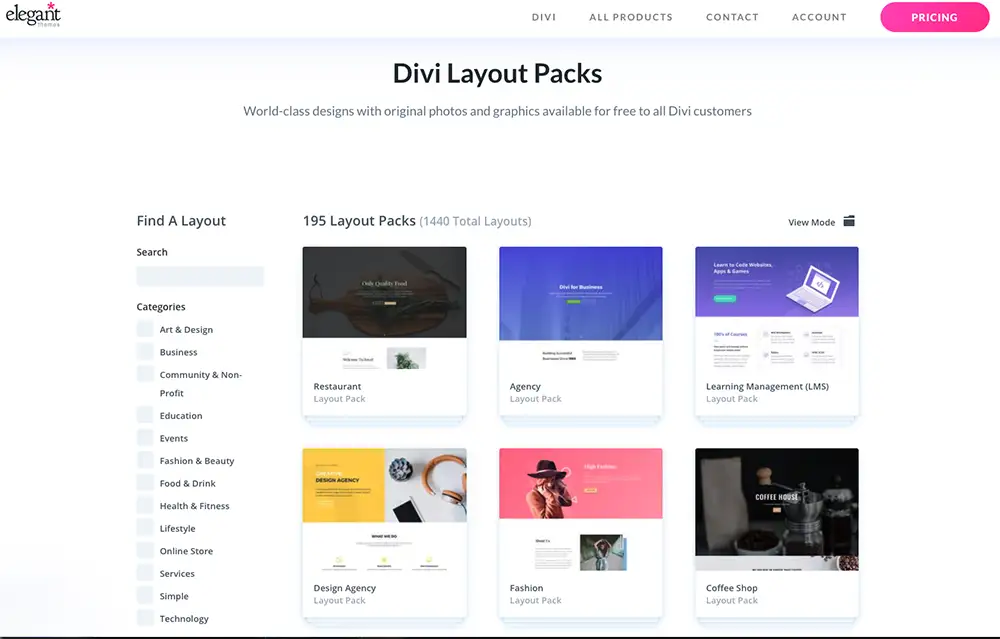
    Advantages of Using Divi Prebuilt Templates

    There are many advantages to using Divi’s prebuilt template. To name a few, Divi’s after-sale customer support is top-notch, with a fast ticket turn-around time. Excellent customer support is vital when you need all the free help you can get. Another benefit of using Divi is its intuitive drag-and-drop visual builder, which designs responsive content for any device, including desktop, tablet, and mobile.

    [elementor-template id=”973″]

    Top 5 Advantages of Divi by Elegant Themes Website Templates

    #1. Variety and Simplicity

    There is a template for every type of website. Divi offers more than 800 prebuilt designs ready for one-click installation, perfect for beginners. The best part is that no coding or web development skill is required to install and use a Divi template.

    #2. Intuitive and User-Friendly

    With the stress-free and intuitive Divi drag-and-drop function, users can add, delete, and move elements on the front end of a website without the need to manipulate confusing back-end codes.

    #3. True Visual Editing

    Divi’s built-in visual control saves time by allowing users to design website landing pages in real time and instantly see the updates.

    #4. Easy Undo, Redo, & Revisions

    Divi works like any modern software application. Users can easily undo, redo, and travel through the entire editing history to recall a step or correct a mistake while editing.

    #5. Responsive Elements

    Divi’s templates are both esthetically attractive and functional. Better yet, your website is already mobile-friendly with Divi. The responsive elements allow the webpages to intuitively fit and automatically adjust on different devices, such as mobile phones, tablets, and computer screens of various sizes.

    Advertisement

    How to Install a Divi Prebuild Template in WordPress

    The Divi theme WordPress template installation is a quick, one-click process. Fast live chat support is also readily available for any setup or post-launch questions. Follow the steps below to get started.

    Purchasing a Divi License

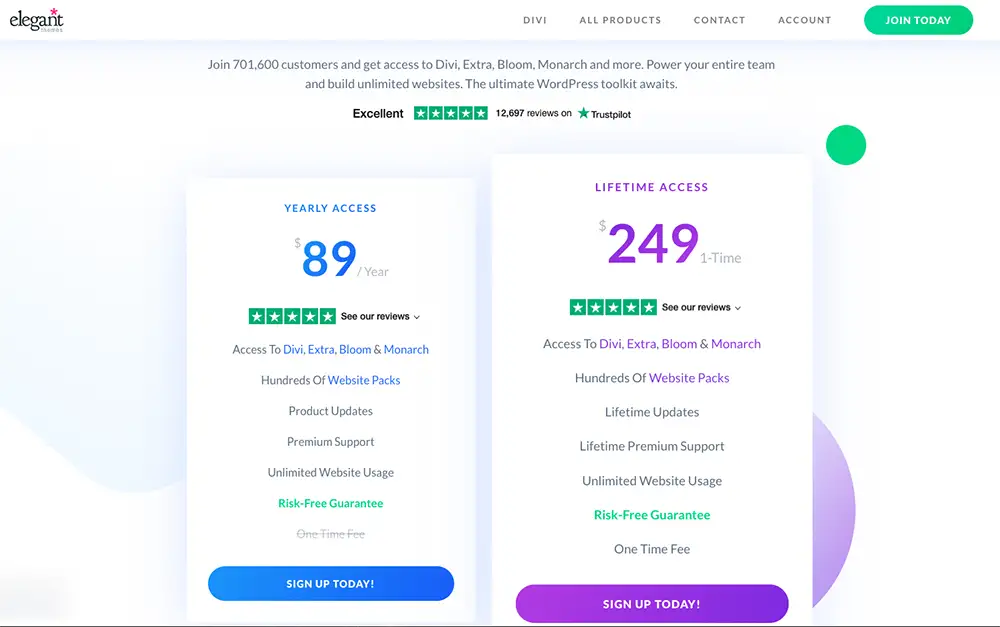
    There is an option to purchase a lifetime license of Divi WordPress templates (best value compared to the annual subscription.) The one-time purchase of the Divi license includes lifetime updates to the Divi themes and allows users to use any website template in the gallery.
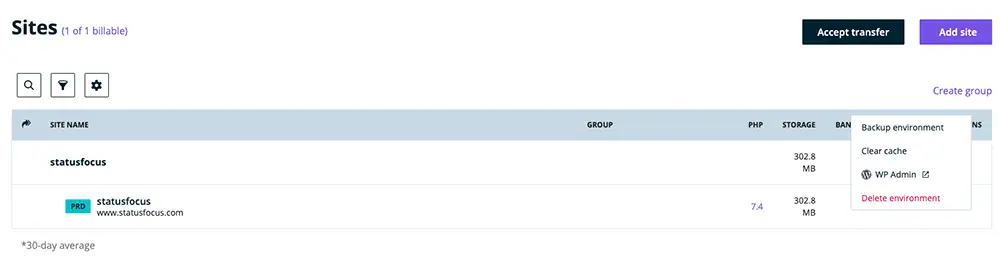
    Before getting started, make sure you have access to WordPress in the web hosting environment to install a website template. Here is a refresher on how to access WordPress admin panel in WPEngine.

    How to Access WordPress Admin Panel in WPEngine

    1. Log in to your WPEngine account.
    2. Select your website’s domain.
    3. Click on the triple-dot icon to the right of the screen.
    4. Click “WP Admin,” which opens up a new tab in the browser to access your WordPress admin panel.
    Step-by-Step Guide on How to Install Divi in WordPress

    Follow the steps below to install the Divi website template on WordPress. You can also follow along with the video instruction or read Divi’s template installation documentation guide.

    Watch a Quick Video on How to Install Divi on WordPress

    https://www.youtube.com/watch?v=T1xmyFe4A2E

    How to Install Divi Prebuilt Website Template in WordPress in 4 Steps

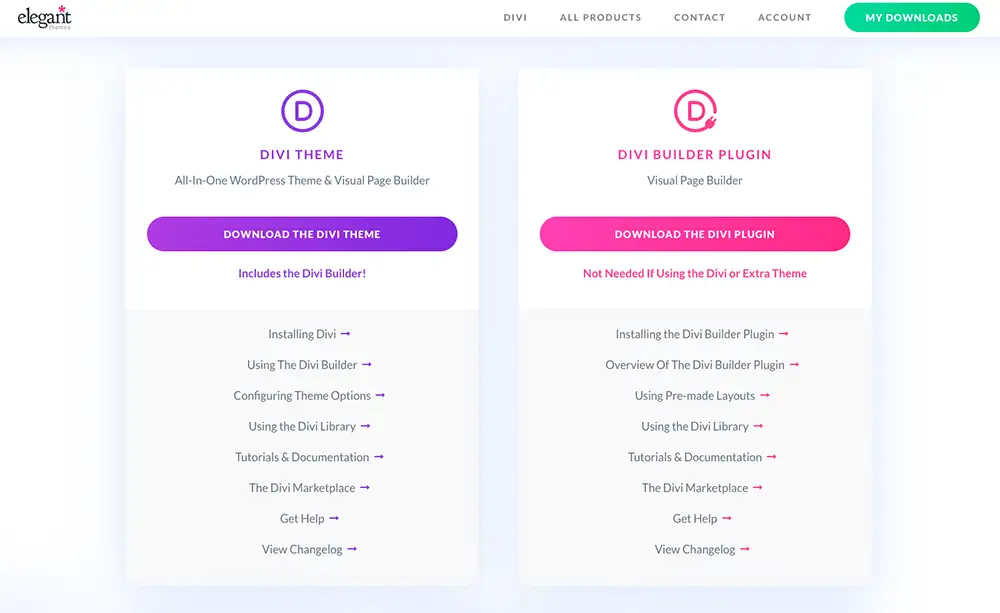
    Step 1: Create a Divi Account and Gain Access to Download the Template Files

    • Log in to your Divi account.
    • Click the “Download the Divi Theme” button, and a file will be saved to your computer.
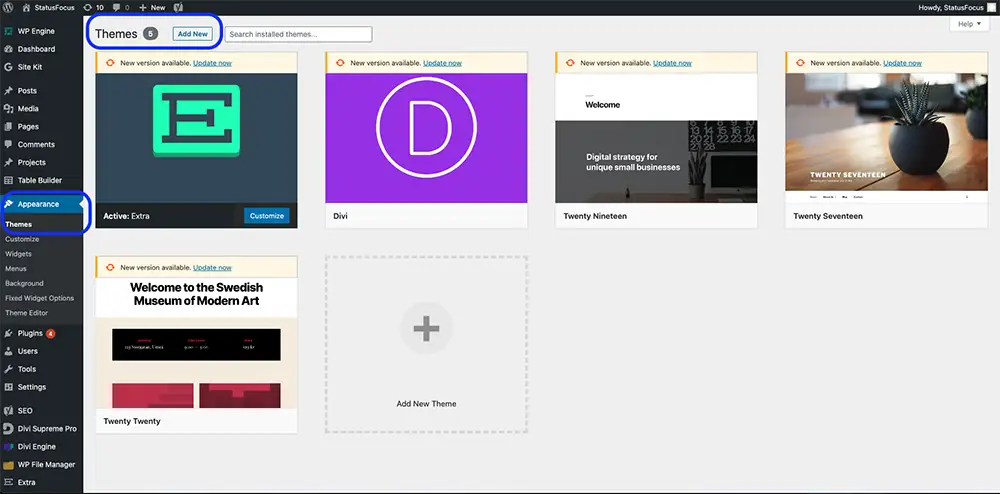
    Step 2: Add a New Theme in WordPress

    • Once the Divi file has been downloaded, log in to WordPress.
    • Go to “Appearance” on the left navigation and click “Themes.”
    • Then click on the “Add New” button.

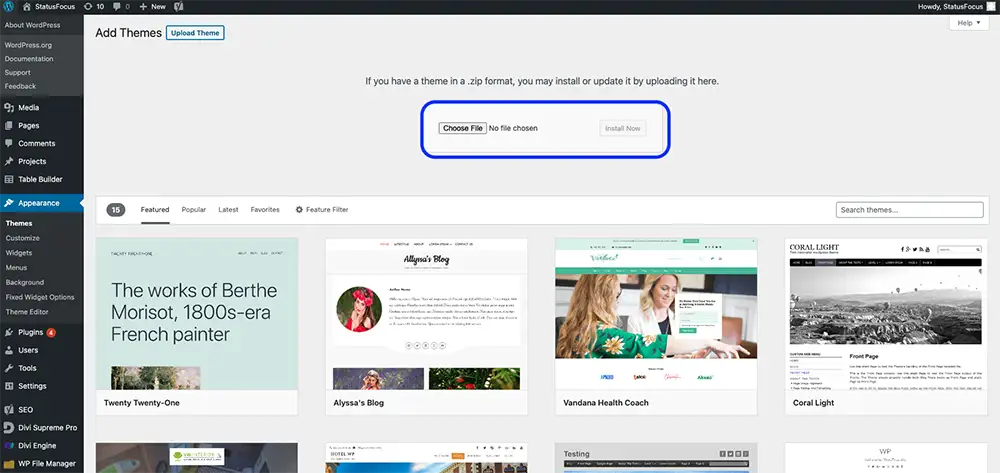
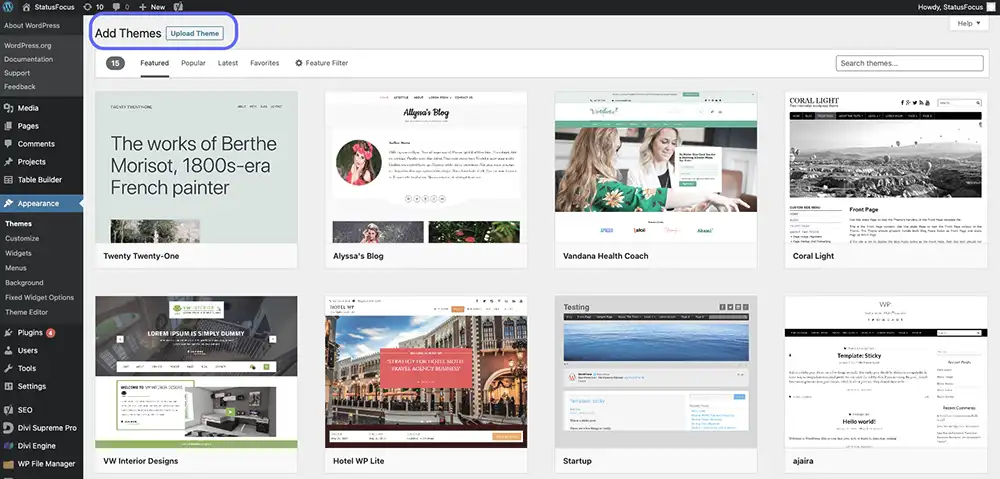
    Step 3: Upload Divi Theme to WordPress

    Next, click on the “Upload Theme” button.
    Advertisement

    Step 4: Upload File in WordPress and Finish Template Installation

    • Click “Choose File” to upload the Divi file you downloaded.
    • Final step – click on “Install Now.”

    Congratulations, you have successfully installed a website template and are one step closer to launching a new website!

    [elementor-template id=”1071″]

    Wordpress Wordpress Templates
    Share. Facebook Twitter Pinterest LinkedIn Email Copy Link
    Previous ArticleThe Complete Checklist for Choosing the Best Fully Managed Web Hosting Service
    Next Article How to Start a Website with WordPress CMS (Content Management System)
    Amppfy

    Amppfy helps everyday people gain financial clarity with practical how-tos and easy-to-use tools for personal finance, budgeting, saving, and smarter money decisions.

    More Like This

    How to Leverage Web Design for the Best Website User Experience and Maximize Website Visitor Engagement

    By AmppfyOctober 30, 2024

    How to Start a Website with WordPress CMS (Content Management System)

    By AmppfyOctober 30, 2024

    The Complete Checklist for Choosing the Best Fully Managed Web Hosting Service

    By AmppfyOctober 30, 2024
    Helpful Resources

    How to Leverage Web Design for the Best Website User Experience and Maximize Website Visitor Engagement

    October 30, 2024

    How to Start a Website with WordPress CMS (Content Management System)

    October 30, 2024

    The Complete Checklist for Choosing the Best Fully Managed Web Hosting Service

    October 30, 2024

    How to Choose the Best Content Management System for a Website

    October 30, 2024

    Financial Clarity. Everyday Confidence.

    Facebook X (Twitter) YouTube LinkedIn
    Calculators

    Emergency Fund Calculator

    Compound Interest Calculator

    Net Worth Calculator

    Mortgage Calculator

    Cost of Living Calculator

    Savings Goal Calculator

    Monthly Budget Calculator

    Latest Resources

    Free Colorado Mortgage Calculator

    February 6, 2026

    Social Security Basics: When To Claim & How It Affects Your Plan

    February 6, 2026

    Free California Mortgage Calculator

    February 5, 2026

    How to Expand Your Portfolio with International Index Funds

    February 5, 2026
    About & Legal

    About Amppfy

    EULA

    Terms of Use

    Acceptable Use Policy

    Privacy Policy

    Cookie Policy

    Disclaimer

    Do Not Sell or Share My Personal Information

    Acceptable Use Policy

    Disclaimer: Amppfy is committed to keeping its information transparent, accurate, and up-to-date. The information on Amppfy is based on our best knowledge and the most objective research and analysis. This information may differ from what you find on the specific product or service provider’s website. All information, content, software, tools, products, or services on Amppfy are presented without warranty or guarantee. Please review the specific provider’s terms and conditions when evaluating products or services. By accessing Amppfy or using our AI generator tools, you acknowledge that you have read, understood, and agreed to our EULA, Terms of Use, Acceptable Use Policy, Privacy Policy, Cookie Policy, and Disclaimer. Amppfy.com uses cookies. For more information, visit Amppfy’s Cookie Policy. Amppfy may be compensated through third-party advertisers and affiliates. For more information, visit Amppfy’s Disclaimer.

    Copyright© 2026 Amppfy | All Rights Reserved

    Type above and press Enter to search. Press Esc to cancel.